 Granola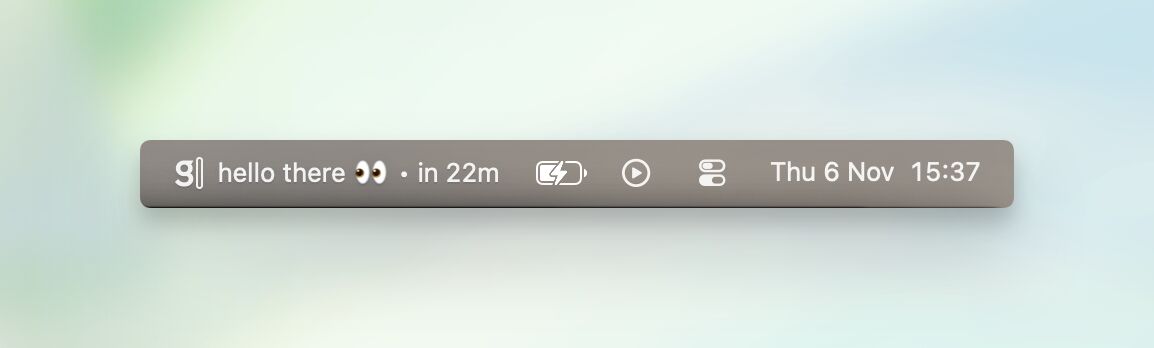
Granola has added a menu bar integration that displays upcoming meetings directly from the top-right corner of the Mac screen, giving users a persistent view of their calendar without opening the app.
The feature, announced on LinkedIn, is designed for people who spend their days in back-to-back meetings and need quick context about what's coming next. Users can glance at the menu bar to see their next scheduled meeting, then click to view the rest of the day's calendar. The update is enabled in Settings under Calendar.
Reducing Context Switching
The menu bar approach addresses a specific friction point for knowledge workers who need to know what's next without breaking focus from their current task. Instead of opening a calendar app or switching to the Granola window, the information sits in the same visual field as the clock and system icons.
For Granola users, this creates a tighter loop between seeing a meeting approach and accessing the AI-generated notes and context the tool provides. The company has been steadily building out calendar-centric features, following their recent update that added @mentions and contextual linking between notes.
The feature joins a growing set of integrations Granola has shipped in recent months, including Zapier automation for post-meeting workflows and Attio CRM syncing for customer-facing teams. The company also recently launched Granola MCP, which connects meeting notes to Claude, ChatGPT, and Cursor via Model Context Protocol.
Availability
The menu bar calendar view is available now in the Granola Mac app. Users need to enable the feature manually through Settings > Calendar. The update is part of Granola's ongoing focus on making meeting context more accessible throughout the workday, rather than requiring users to actively seek it out.
Sources
1 checkedHow we cover tool news: Create With's tool desk drafts these reports with AI from the sources listed above and checks them against those sources before publishing.


 Zapier

 Supabase