Supabase
 Bolt
Bolt Lovable
 Cursor
01 / 03
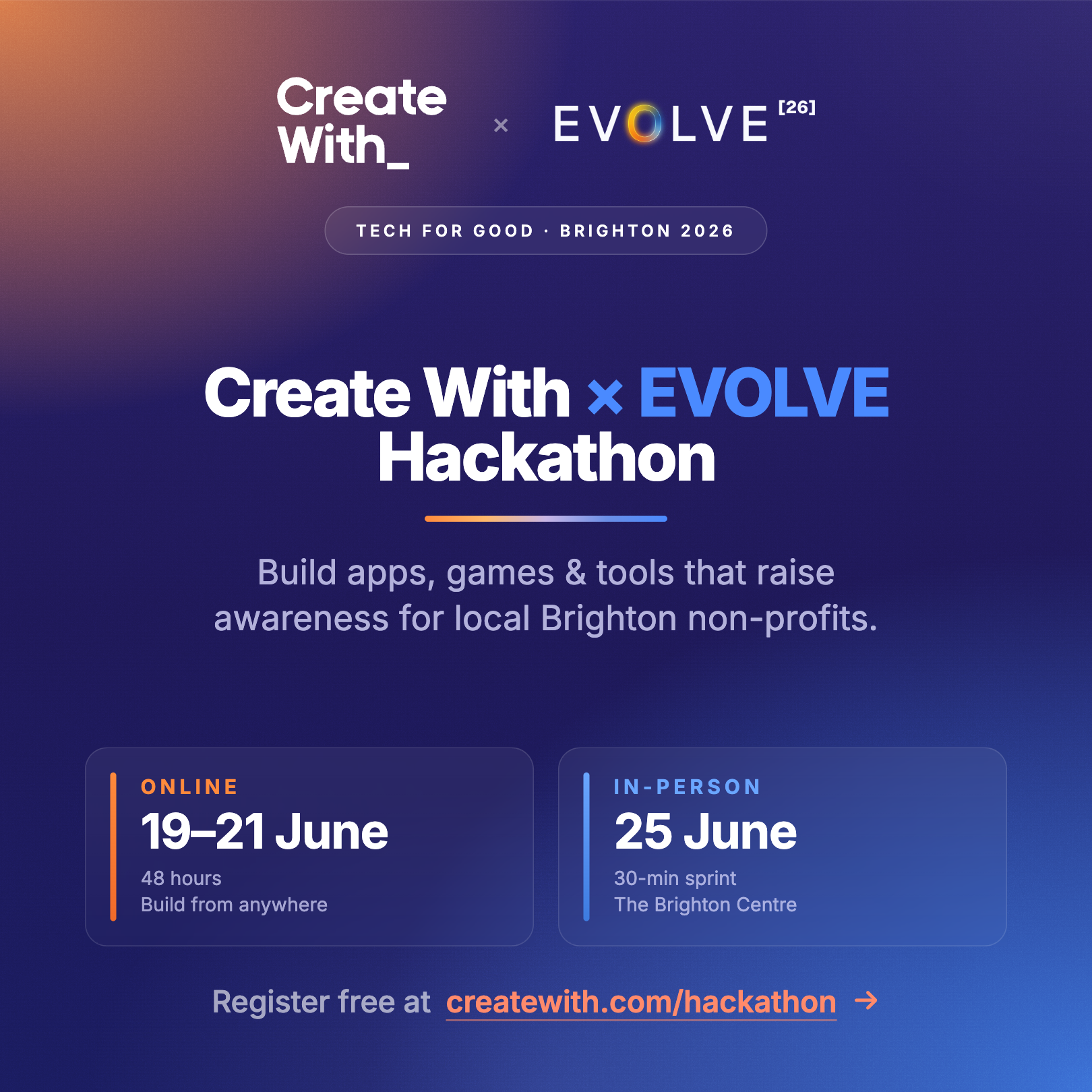
We're hosting a hackathon!
Big news: We're organising a hackathon in collaboration with EVOLVE conference!
Why? Because hackathons are the quickest way to get non-technical people doing some hands-on building.
Our hackathon has two versions:
- an online 48hr version from 19-21st June (register here) open to anyone in the world 🌏
- an in-person 30 minute live version at the Create With Conference on 25th June (register here) open to conference attendees 🎟️
The best part is the hackathon will be supporting three local Brighton non-profits in their missions 💚. There will also be prizes for the winners 🎉
02 / 03
Breaking: OpenAI Drops a Vibe Coding Bombshell
OpenAI just announced Sites, and it's looking like a direct shot across the bow of every vibe coding tool out there. The feature lets you build websites through conversation with their Codex model, no technical skills required.
This puts pressure on the entire ecosystem — from OG no-code tools like Bolt and Lovable to developer-focused platforms like Cursor. The timing couldn't be more interesting, given that vibe coding has exploded in popularity over the past year.
03 / 03
Deep Dive: Vibe Coding Your Way to a Working App
In honour of the upcoming hackathon, we thought we'd put together a Vibe Coding 101 guide for anyone who wants to take their idea from zero to one, either at the hackathon or just in normal life 🙌
The traditional path to building software has been forever changed. A few years ago, creating even a basic web app required months of coding bootcamps or a hefty developer salary. Today, anyone who can describe their idea clearly in English can have a working prototype running by dinnertime.
This shift birthed "vibe coding" — a new approach where you're not really learning to code, but learning to direct an AI that codes for you.
From Idea to Demo in Hours, Not Months
The speed isn't just impressive — it's fundamentally changing how we validate ideas. Consider what rapid prototyping unlocks:
-
Internal pitches that stick: Most workplace ideas die in PowerPoint purgatory. A rough working version that colleagues can actually click through transforms abstract concepts into tangible discussions about user flows and real functionality.
-
Client demos that close deals: Telling a client "we could build a portal where your customers do X" is just another bullet point. Showing them that portal, complete with their branding, during the actual pitch meeting is how contracts get signed.
-
Cheap idea validation: Most product concepts don't survive contact with actual users. A working V1 lets you put something in front of real people within days, revealing fatal flaws before you've burned through months of development budget.
The common thread? A rough working version moves conversations in ways that words simply can't. It's the cheapest possible way to discover whether your idea has genuine potential.
The Right Mindset for AI-Assisted Building
Successful vibe coding requires a mental shift. You're not the student here - you're the product manager working with an intermediate developer who happens to be made of algorithms.
The product vision is entirely yours. The AI exists to execute your instructions, not to make creative decisions about what you're building.
The core skill isn't coding, it's describing what you want precisely enough that an AI can build it, then knowing how to course-correct when things go sideways. Be curious about how things work and willing to make mistakes. Be scrappy and resourceful.
This means pushing back when something doesn't make sense, demanding explanations for confusing suggestions, and maintaining clear ownership over the product direction.
Tool Selection Made Simple
For V1 builds, Lovable is our current recommendation. It's a web-based AI app builder where you describe what you want, see the app appear in a live preview, and get a shareable URL with one click.
You might have heard of alternatives like Replit, Bolt, v0, or coding agents like Claude and Cursor. They all work. But app builders like Lovable are specifically designed for V1s because they eliminate every decision that isn't about your actual product — hosting, databases, deployment, file architecture.
Coding agents offer a higher ceiling but assume you already know where to point them. If this is your first rodeo, pick Lovable and stop researching tools.
Why You Should Plan Before You Build
Here's where most beginners sabotage themselves: they open their chosen tool and immediately type "build me a marketplace for X." What follows is a generic template that ignored fifty crucial decisions, leading to hours of frustration.
Before touching any building tool, open Claude or ChatGPT and paste this exact prompt:
I'm building the first version of an app. Here's the idea: [one sentence]. Interview me about it. Ask me one question at a time. Cover: who the user is, the single most important feature, what data needs to be stored, what the main user journey is from landing on the page to getting value, and what the design should feel like. After I've answered, write me a detailed build prompt I can paste into Lovable.
Answer those questions properly. When the AI produces your build prompt, read it carefully and add anything missing. That prompt is the most important thing you'll write during your entire build session.
Time investment depends on your timeline:
- Full afternoon build: 30 minutes of planning
- Weekend project: 1-2 hours (pays back exponentially)
- Live demo prep: 4-5 minutes writing the prompt by hand
What Separates Strong Prompts from Weak Ones
Specificity beats cleverness every time. Compare these approaches:
Weak prompt:
"Build me a lead capture site for a photographer."
Strong prompt:
"Build a simple lead capture site for a wedding photographer called Olive Studio. One page. Above the fold: large hero with studio name, tagline ('Documentary wedding photography in the Cotswolds'), and 'Get in touch' button that scrolls to form below. Form fields: name, email, wedding date, venue, how they heard about us. On submit, save to database and show thank-you message: 'Thanks, we'll be in touch within 48 hours.' Design: editorial, warm, cream and dark green palette, serif headings, generous white space, large hero image placeholder."
The strong prompt delivers a working V1 on the first build. The weak prompt delivers a generic template and an afternoon of frustration.
The pattern that works: what it does, who uses it, the screens, the data, the user journey, the look and feel. Cover those six elements and the AI has everything it needs.
Iterate, Don't Restart
Whatever your first build produces becomes your foundation. Resist the urge to delete everything and start over. The faster path almost always involves fixing what's already there.
Work in this specific order:
-
Test the core user journey end-to-end first — can someone actually accomplish the main task your app is designed for?
-
Fix the most broken element next — usually a non-functional button, a form that doesn't save, or a workflow that loops endlessly
-
Improve what looks worst — typically the hero section, spacing issues, or colour problems
-
Polish the copy last — replace placeholder text the AI invented
For substantial changes, use plan mode if available. Lovable offers this: toggle from Build to Plan in the chat input. The AI explains what it'll change before making any modifications. Review the plan, push back if it's wrong, then approve. This catches misunderstandings before they're baked into your code.
Start fresh chat sessions for each meaningfully new feature, providing a brief summary of existing functionality. Long conversations get progressively slower and less intelligent.
Five Time-Wasting Traps to Avoid
These patterns consistently derail V1 builds:
- Skipping the planning step: Four minutes of structured prompting saves thirty minutes of fighting with the AI
- Building five features instead of one: V1s win on depth, not breadth. One thing that works completely beats five things that mostly function
- Trusting AI time estimates: It might say "two weeks" and finish in five minutes. Ignore estimates, just try the change
- Running single chat sessions forever: Quality degrades as conversations extend. Fresh sessions maintain higher performance
- Not testing after each modification: AIs sometimes break existing functionality when adding new features. Click through core flows every time
Your V1 Readiness Checklist
Before shipping, demoing, or showing anyone, verify:
- Live URL functions in an incognito browser window
- Core user journey works completely, start to finish
- No placeholder text remains ("Lorem ipsum," "Your tagline here")
- Forms actually save data somewhere demonstrable
- Ask Lovable to do a security audit to make sure your user data is safe, and fix any issues
- You can deliver a 60-second walkthrough covering the target user, problem, and demo
If you can tick all six boxes, your V1 is ready. If not, fix missing elements before adding anything else.
The cost of testing ideas has effectively collapsed to near zero. A V1 you can build in an afternoon will teach you more about your idea's viability than three months of meetings and market research combined.
You won't emerge as a software engineer after your first V1. But you will have something working, and a much clearer understanding of what's actually possible. The next idea will build faster, the one after that faster still.
The formula remains elegantly simple: pick a sharp idea, invest more time in prompting than feels necessary, ship the rough version, then iterate toward quality. That's the entire loop.

Written by
Kieran Ball
Co-founder, Create With

Written by
James Devonport
Co-founder, Create With
The Create With Briefing
Get the next edition first.
Real-life use cases, the tool changes that matter, and the best events near you. Free, every Tuesday, to 8,600+ readers.