 v0
v0
v0 can now turn an entire Figma file into a working, multi-screen app from a single shared link. The update moves the AI app builder beyond recreating isolated screenshots, giving its agent access to the structure, assets and design system behind a product flow.
According to the company’s LinkedIn announcement, v0 explores the pages and frames in a file, selects the designs relevant to the user’s request and builds them as one app. That makes the integration more useful for projects such as onboarding sequences, dashboards and checkout flows, where several screens need to share navigation, components and visual rules.
The feature is available on paid v0 plans. It does not require a Figma plugin or the desktop application.
What v0 Reads From a Design File
Users can paste a Figma file link directly into a v0 chat or select Create from Figma using the attachment button. If the accounts have not already been connected, v0 prompts the user to authorize access before inspecting the file.
The agent can read:
- Pages, sections and frames
- Design tokens, variables and colors
- Auto layout, spacing, dimensions and text
- Icons, logos and other image assets
- Components, styles and their names
- Developer resources attached through Dev Mode
Those Dev Mode resources can include links to code, documentation, specifications or component libraries such as Storybook. This gives the agent more context than a flattened image can provide and may help it translate an existing design system into implementation choices.
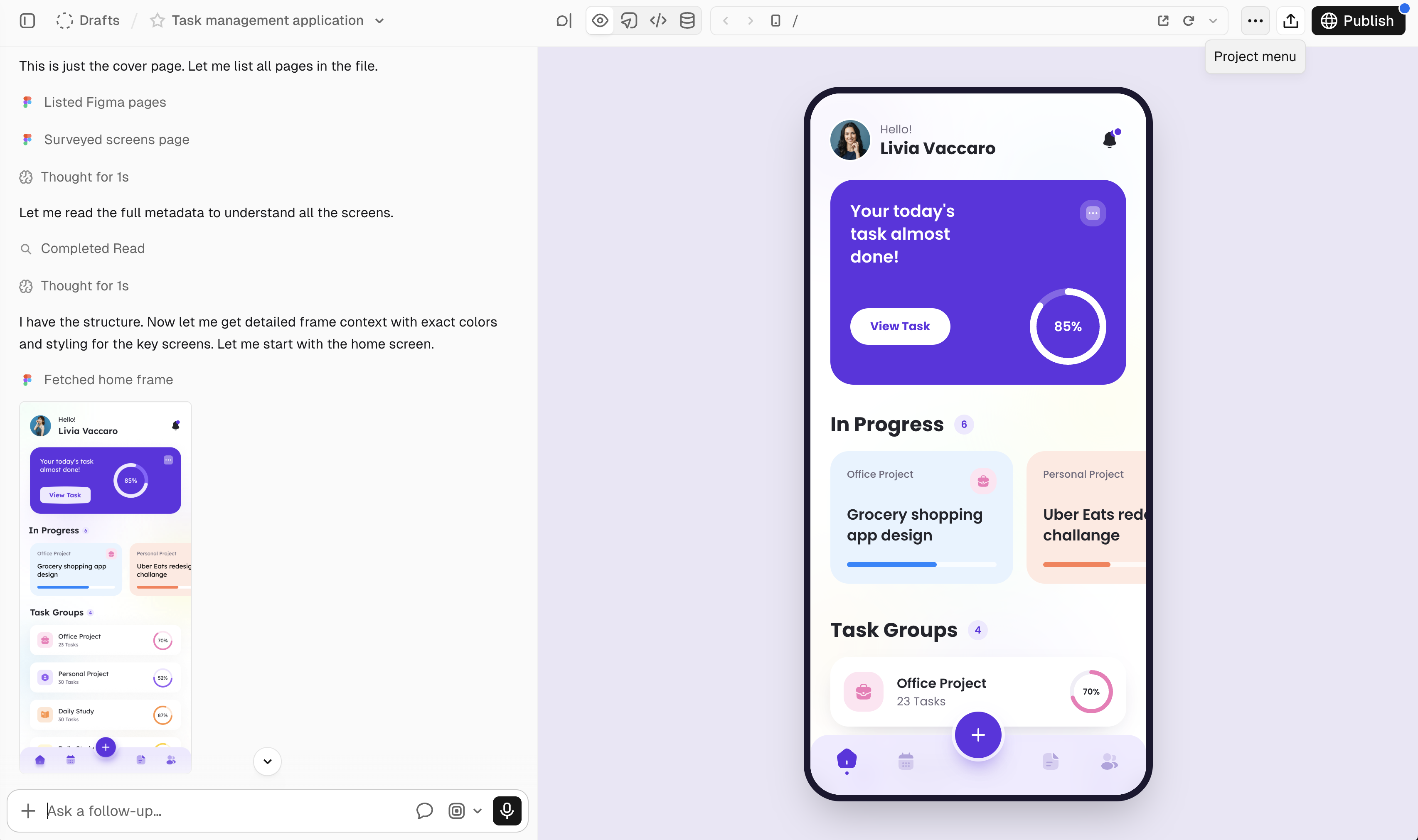
The integration also uses frame images as visual references. As each screen is built, v0 compares the result with the corresponding Figma frame. The company’s documentation says the frames being read appear in the chat, allowing users to verify the selection or direct the agent to another page or frame.
That inspection loop is important because large Figma files often contain archived concepts, component explorations and unrelated product areas. v0 recommends naming the relevant page or section in the prompt when sharing a large file. Users can also specify the feature or flow they want, rather than asking the agent to interpret the entire workspace without direction.
A More Direct Design-to-Code Workflow
The new integration replaces v0’s older import-and-screenshot process with direct inspection of a file’s structure and styles, according to its July changelog. The Figma capability also loads automatically when a message includes a Figma link.
There are two practical ways to use it. A file link is intended for building several screens or a complete flow. A frame link, copied from a selected frame in Figma, is better suited to reproducing one screen or component. In both cases, the prompt can provide additional direction about behavior and scope.
For small teams, this could reduce the manual handoff between design and an initial implementation. Assets no longer need to be exported one by one, and established tokens or component names can carry into the generated project. Human review will still matter, particularly for application logic and deciding which parts of a large design file belong in the finished product.
The release also broadens v0’s role beyond its chat interface. The company has separately opened app generation to automated systems through the v0 API and added tools for tracking AI usage and costs. Full-file Figma inspection addresses another part of the process, turning an established visual specification into a connected starting point for an app.
Frequently asked questions
What is v0’s full Figma file import?
It is an integration that lets v0 inspect a shared Figma file and turn selected pages and frames into one working app. The agent can use the file’s layouts, text, assets, components, styles and design tokens while generating the screens.
Which v0 plan is required for the Figma integration?
The integration is available on paid v0 plans. The documentation does not identify a specific paid tier or separate price for the feature.
Does v0 require a Figma plugin or desktop app?
No. Users can connect their Figma account and paste a file or frame link into v0, without installing a plugin or using the Figma desktop application.
Sources
1 checkedHow we cover tool news: Create With's tool desk drafts these reports with AI from the sources listed above and checks them against those sources before publishing.



 Supabase

