 OpenClaw
OpenClaw is tackling one of local AI’s persistent weaknesses: installation. The personal agent platform has released a native installer and guided onboarding flow for macOS, alongside a simpler way to configure local models on Windows PCs equipped with NVIDIA RTX GPUs.
The changes, detailed in an official blog post, are designed to shorten the path from downloading OpenClaw to running a working agent. The company says even technically experienced users have sometimes spent more than 30 minutes wrestling with the previous setup process.
That friction matters because OpenClaw’s central proposition is that users can run an AI agent on their own hardware and operate it through chat applications. If deploying the software requires extensive terminal work, authentication troubleshooting and model configuration, much of its appeal remains limited to developers willing to maintain the underlying stack.
A Native App Experience for Mac Users
OpenClaw’s new macOS installer replaces that terminal-first experience with a familiar application interface. Users can download the software, move through guided installation and begin configuring an agent without entering command-line instructions.
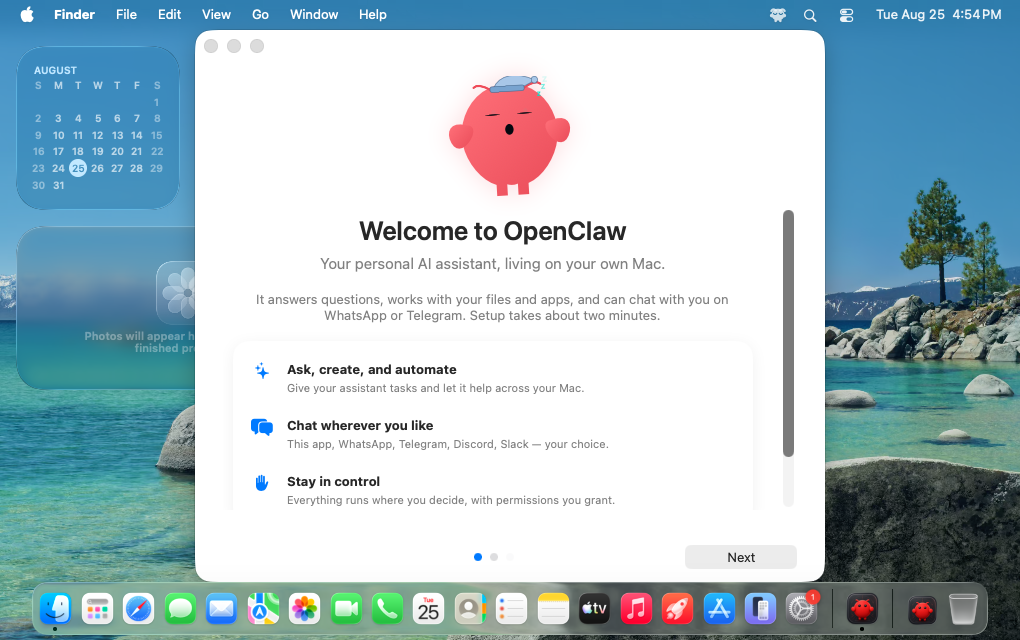
According to OpenClaw, the team tested the flow in clean environments to identify points where connections and authentication commonly fail. That should be particularly useful for small businesses and independent builders who want the control of a locally operated agent but do not want deployment to become a separate infrastructure project.
The release extends work that started with OpenClaw’s Windows App installer in June 2026. It also follows the broader onboarding and browser changes included in OpenClaw 2.0, suggesting setup has become a product priority rather than an issue left to documentation.
The Mac app can also look for AI access that is already configured on the computer. OpenClaw says it can detect and verify existing connections to services and tools such as Claude, Codex and Ollama. This removes the need to manually reproduce configuration that is already working elsewhere on the machine.
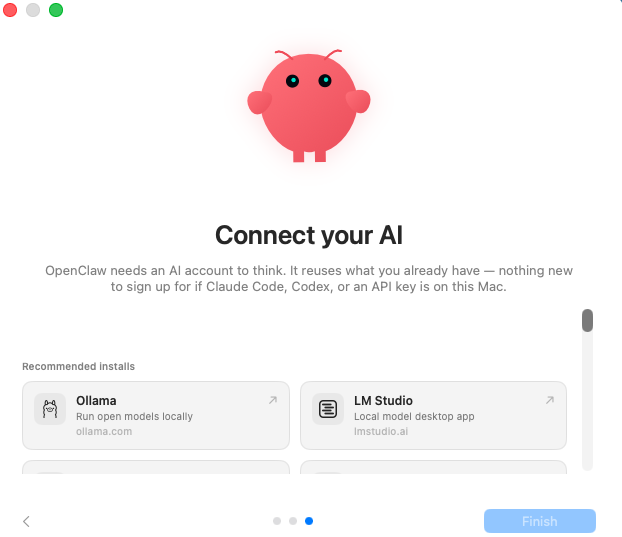
The automated path does not eliminate advanced options. Power users can still select their own model providers, local inference systems, gateways and configuration settings. That split is important: newcomers get a guided route, while experienced operators retain the flexibility that made OpenClaw attractive in the first place.
Windows RTX Setup Pushes Further Into Local AI
On Windows PCs with NVIDIA RTX hardware, OpenClaw is going beyond detecting an existing model connection. The updated setup can help users configure a local model tuned to the available hardware, reducing the manual work normally involved in matching model software with a particular GPU environment.
The practical advantage is privacy and control. A locally running model can process supported agent workloads on the user’s computer rather than relying entirely on a hosted model provider. It may also reduce dependence on external service availability, although actual performance will still depend on the PC, model and workload involved.
OpenClaw has not framed the update as a new agent capability. Instead, it addresses whether users can reach those capabilities without abandoning installation halfway through. For builders, consultants and small teams, that can be as consequential as another feature: software that runs locally only becomes useful once someone can reliably install, connect and maintain it.
The release also fits with OpenClaw’s recent efforts to make self-hosted agents more operationally predictable. The project has introduced extended-stable releases and a maturity scorecard for users evaluating features for more critical workloads. Easier onboarding lowers the entry barrier; stability guidance helps users decide what should move beyond experimentation.
Frequently asked questions
What is OpenClaw’s new macOS installer and Windows RTX setup?
It is an onboarding update that lets macOS users install and configure OpenClaw through a native, guided app interface. On supported Windows PCs with NVIDIA RTX GPUs, OpenClaw also streamlines the process of setting up a local AI model suited to the computer’s hardware.
Does the macOS installer require terminal access?
No. OpenClaw says Mac users can complete the standard installation and onboarding flow without touching the terminal. Advanced users can still manually choose providers, local inference tools, gateways and other configuration options.
When is the updated setup available?
OpenClaw announced the macOS installer and improved Windows RTX local model setup on September 3, 2026. The company directs Mac users to download the new app, while its Windows application installer had originally launched in June 2026.
Sources
1 checkedHow we cover tool news: Create With's tool desk drafts these reports with AI from the sources listed above and checks them against those sources before publishing.




 Supabase

