 Bubble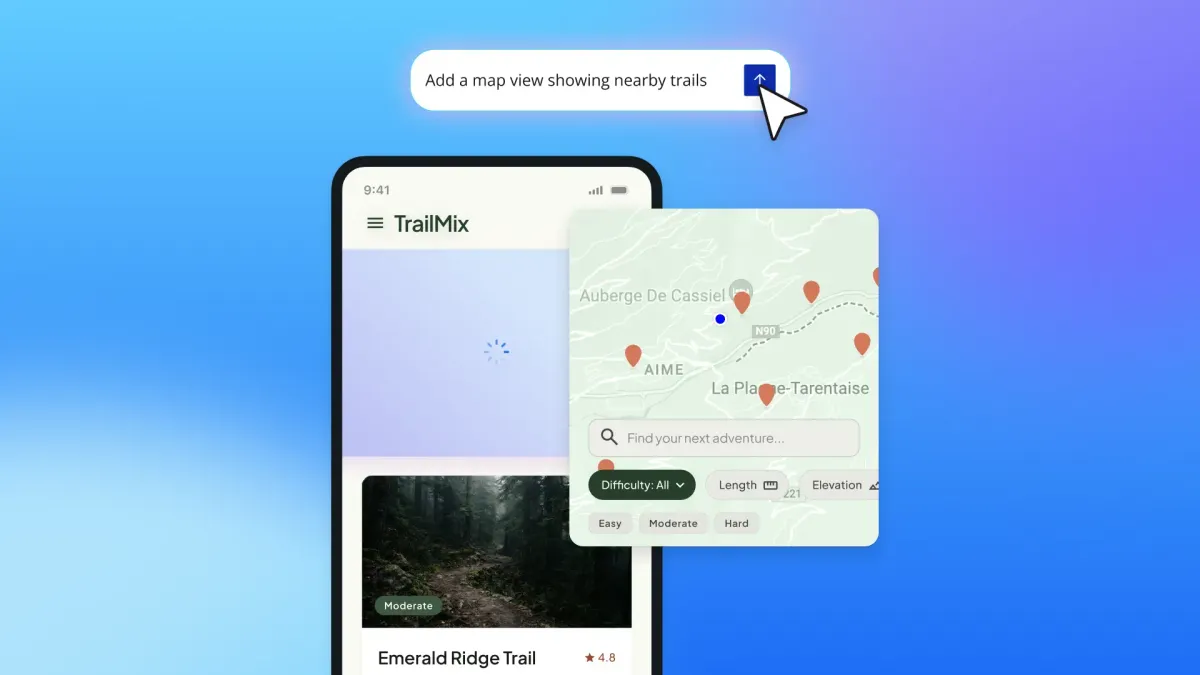
Bubble is widening the scope of its in-editor AI assistant, turning it from a primarily web-focused helper into an agent that can build and edit complete native mobile apps. The updated Bubble AI Agent can create mobile interfaces, workflows and data structures, while also setting up API connections and attempting to fix app issues automatically.
The expansion, detailed in Bubble’s official announcement, addresses a significant limitation in the previous mobile implementation. Until now, the Agent could edit mobile user interfaces and dynamic expressions, but not every underlying part of an app. Bubble says the new version can work across the full native mobile project without those restrictions.
From Mobile Screens to Complete App Logic
The practical change is that builders can now describe a mobile feature and have the Agent handle more than its visual layer. A request for a location-based search screen, for example, can produce a map, search controls and mobile interface patterns, with the app’s existing styles applied. Follow-up prompts can then add the workflows and data operations needed to make those elements functional.
The Agent can also use screenshots of an existing web frontend as a design reference. That could shorten the process of adapting an established web product for mobile, particularly for small teams that do not have a dedicated mobile designer. It is not simply generating an isolated mock-up, according to Bubble. It works within the existing project and can draw on its data model, styles and logic.
That distinction matters because Bubble’s web and native mobile apps share a backend. A business moving a customer portal, marketplace or internal tool onto mobile does not have to begin with a separate database. The Agent can extend the existing application into a platform-specific experience instead.
Bubble has been steadily making the assistant more aware of the broader editor environment. The mobile release follows an earlier update in which the Bubble AI Agent gained the ability to detect installed plugins and recommend marketplace additions. Together, the changes point toward an agent designed to operate across more of a production application, rather than functioning only as a screen generator.
APIs and Automated Troubleshooting
The update also gives the Agent the ability to set up connections to third-party services. For builders, API configuration is often one of the points where a no-code project becomes unexpectedly technical, involving authentication details, endpoints and response structures. Allowing the Agent to establish those connections could reduce setup work when an app needs external data or services.
Bubble also says the Agent can automatically fix issues inside an app. The announcement does not provide a comprehensive list of supported error types, so builders should not assume it replaces testing or manual review. Still, automated diagnosis inside the editor could be useful when an AI-generated workflow fails or a configuration produces an identifiable error.
These additions make the Agent more consequential, but they also increase the need for oversight. Changes to data, workflows and external integrations can affect permissions, usage costs and production behaviour. Small businesses should review generated logic, test API calls with non-sensitive data where possible, and verify mobile workflows before publishing.
For existing Bubble users, there is no separate feature to install. The Bubble AI Agent remains in beta, is free to use during that beta and is rolling out to all users. Anyone who already sees the Agent inside the editor has the latest version; Bubble says users who do not yet have access can contact its support team to request earlier enablement.
Frequently asked questions
What is Bubble Bubble AI Agent?
Bubble AI Agent is an AI building assistant inside the Bubble editor. It can now build and edit native mobile interfaces, workflows and data, as well as configure API connections and automatically address some app issues.
How is the updated Agent different from its previous mobile capabilities?
Previously, the Agent’s mobile editing was limited to user interfaces and dynamic expressions. The new release allows it to edit every part of a native mobile app, including workflows and data, while using the project’s existing backend and styles.
How much does Bubble AI Agent cost, and when is it available?
The Agent remains in beta and is free to use during the beta period. Bubble says the update is rolling out to everyone; users who do not yet see it in the editor can contact Bubble support to request access sooner.
Sources
1 checkedHow we cover tool news: Create With's tool desk drafts these reports with AI from the sources listed above and checks them against those sources before publishing.







 Stripe
 Supabase