Figma
Figma Claude
 Make
Make Supabase
Last issue we mentioned Figma's new official MCP server in the radar section. James has been using a different one. It's a free, open-source tool called Figma Console MCP, and it has turned Claude Code and Figma into a side-by-side design workflow he now uses daily. In this deep dive we'll cover what it is, how the workflow looks, and where the rough edges are.
01 / 07
What it actually does
MCP (Model Context Protocol) is the standard way of connecting an AI to outside tools, a bit like a universal plug socket. Figma Console MCP is an open-source MCP server that plugs Claude Code into the Figma file you have open on your screen.
Once connected, Claude can see what's on your canvas and draw straight onto it. You describe the screens you want in plain English and they appear in your file, where you can edit them like anything you'd design by hand.
02 / 07
Why not Figma's own AI tools
Figma has its own answers to this, and James tried both first. Figma Make generates designs and apps from prompts, and Figma's official MCP server connects AI tools to your files in a similar way.
Both showed promise, but both have usage meters attached. Make runs on AI credits that vary with the model and the complexity of the task, while the official MCP server has rate limits on reading your designs, from 20 reads a month on the free plan up to a few hundred a day on paid seats.
That seems fair enough, as the AI costs Figma money to run. In practice though, James kept being pulled out of the flow mid-design, which is what sent him looking for an alternative.
03 / 07
The setup
After seeing Figma Console MCP recommended repeatedly on X, James pasted the GitHub repo into Claude Code and asked it to configure the integration for him. Claude handled most of the setup on its own.
On the Figma side you need the desktop app plus a small bridge plugin that comes with the tool. The daily routine from there is simple. Open Figma, open the file you want to work on, and run the plugin from the plugin menu. Claude Code then talks directly to that file.
04 / 07
How it fits a working day
James keeps Figma on the left of his screen and Claude Code on the right. He describes what he wants and Claude builds it on the canvas.
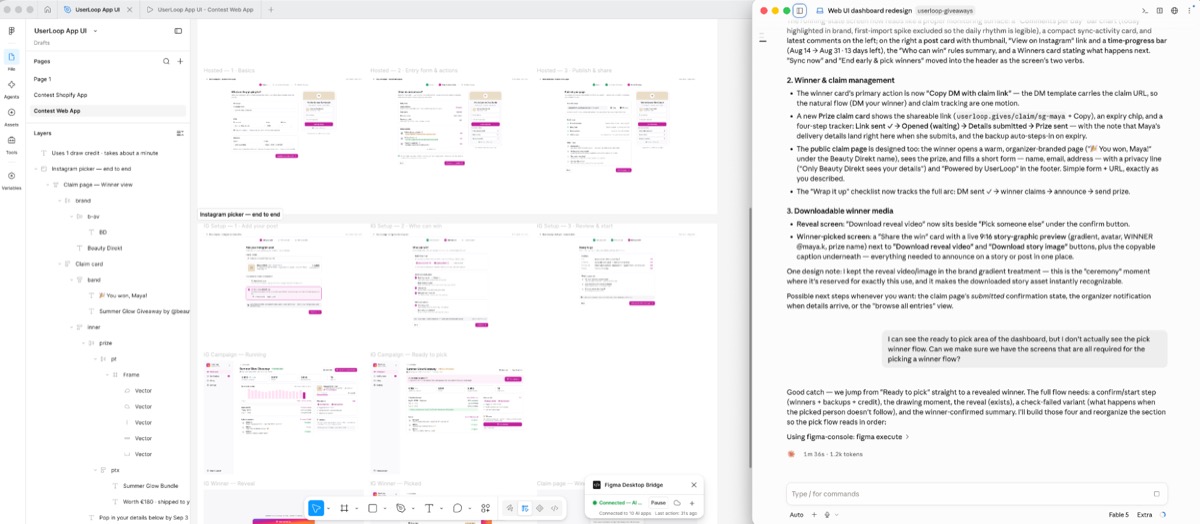
He mostly uses it to design whole app flows. Ask for every screen in a user journey and Claude creates them, and because it can read the canvas as well as write to it, you can keep refining the same work. Add missing states, expand a flow, change the visual direction. It feels like an ongoing design conversation rather than a one-off generation.
05 / 07
The unexpected win: App Store screenshots in ten languages
The most useful application so far has been outside product design. James uses it to produce App Store screenshot sets in ten languages, translating the copy and keeping every language's set aligned whenever the source design changes.
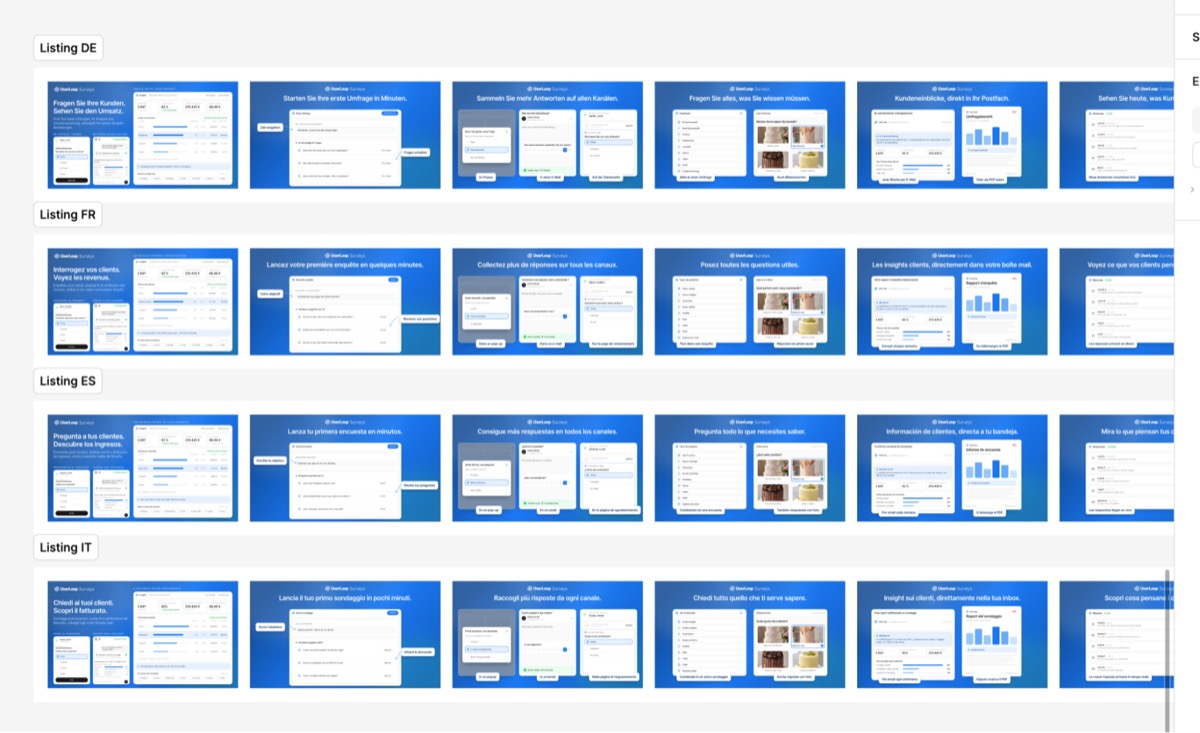
What used to take hours of duplicating, editing and checking is now handled through the same conversation with Claude.
06 / 07
The reality check
- This is a community-built open-source project, not an official Figma product. A Figma update could break it, and there's no support team to lean on.
- It needs the Figma desktop app, and remembering to run the bridge plugin each session is a small but real bit of friction.
- Your Claude usage still costs money. The Figma side has felt effectively unlimited to James on Figma's cheapest paid plan, which is $16 a month, but Claude Code has its own usage limits and heavy design sessions eat into them.
- James started on Figma's free plan and it worked, so you can trial the whole thing without paying Figma anything.
07 / 07
How to start
If you already use Claude Code and the Figma desktop app, the setup cost is small. Paste the GitHub repo into Claude Code, ask it to configure the integration, then import the bridge plugin when prompted.
Start with something contained, a single user flow or a repetitive job like localised screenshots, and expand from there.
This tool has changed the role AI plays in my (James') design process. Instead of generating an idea somewhere else and manually rebuilding it in Figma, Claude Code works as a collaborator inside the actual canvas. It helps me design the app, then helps me package and market it once it's ready. The time it has given back to me has been substantial.

Written by
Kieran Ball
Co-founder, Create With

Written by
James Devonport
Co-founder, Create With
The Create With Briefing
Get the next edition first.
Real-life use cases, the tool changes that matter, and the best events near you. Free, every Tuesday, to 8,600+ readers.