Skip to content
All tool news

Tool desk · Updated daily

Tool news·Vercel·

Vercel Adds Sessions View to AI Gateway Logs.

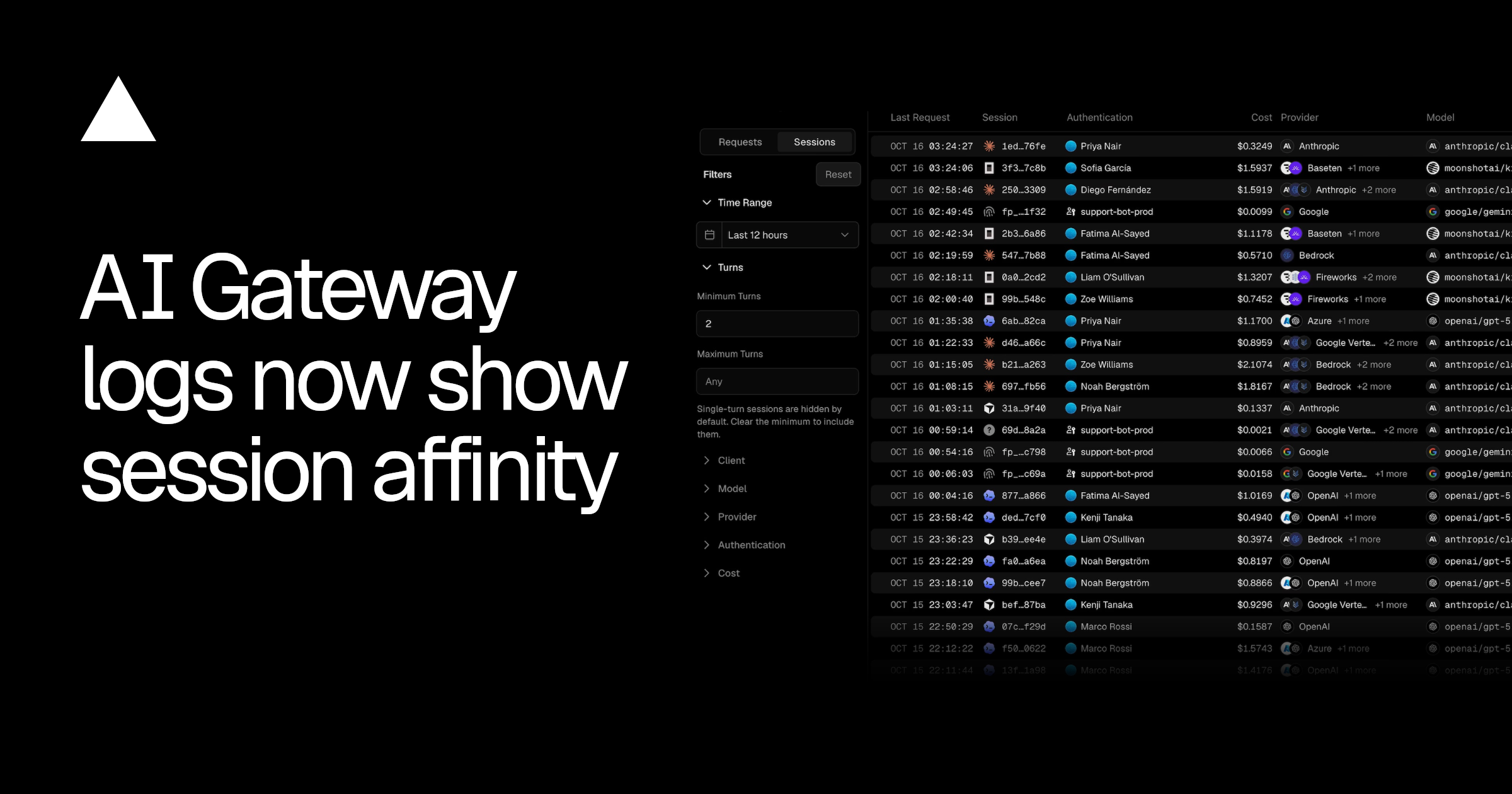
Vercel’s Sessions view groups AI Gateway requests by session, showing routing, cost, models, providers, agents and cached input.

CW

Create With tool desk

3 sources checked · 2 min read · 3 sections

ShareLinkedIn
Vercel Adds Sessions View to AI Gateway Logs

The Sessions view in Vercel’s AI Gateway logs groups individual requests into complete sessions. It shows how session affinity routed each request, alongside the models, providers and costs involved across the conversation.

According to the Vercel changelog, each row identifies the coding agent or app that ran the session. Examples include Claude Code, Codex and Cursor.

What Vercel’s Sessions view shows

The new grouping replaces a request-by-request inspection with a session-level record. Builders can see which services handled a conversation and how much of the input was cached across every turn.

Session fieldWhat it shows
Agent or appThe coding agent or application that ran the session
RoutingHow session affinity routed each request
Models and providersThe models used and the providers that served them
CostSpend attached to the session
Cached inputHow much input was cached across the session’s turns

The logs also expose the session ID, number of turns and cache hit rate. These fields connect routing behaviour with the resulting cost and cache usage, without splitting one conversation across separate request rows.

Following one AI session from agent to provider

A session may include several turns and requests. The Sessions view keeps those requests together while showing the agent that started the work, the models and providers used, and the associated spend.

This creates one place to inspect whether session affinity kept requests on the expected route. The cache figures show how much input was reused throughout the same conversation. Teams can compare sessions from different agents or apps using the same set of fields.

The release joins the wider set of changes covered in What Vercel Shipped Across AI Gateway in Mid-October.

Vercel published the Sessions view update on 17 October 2026. It is available through the AI Gateway logs dashboard.

Frequently asked questions

What is Vercel Sessions view?

Sessions view is an AI Gateway logs view that groups related requests into sessions. Each row shows the agent or app, routing, cost, models, providers and cached input for that session.

What information does Sessions view include?

It includes the session ID, coding agent or app, cost, models, providers, turns and cache information. It also shows how session affinity routed each request.

Which Vercel plan includes Sessions view?

The changelog does not specify plan or pricing requirements. It links users directly to the Sessions view in the AI Gateway logs dashboard.

Sources

3 checked

How we cover tool news: Create With's tool desk drafts these reports with AI from the sources listed above and checks them against those sources before publishing.

Worth passing on?

ShareLinkedIn

Go deeper on Vercel

Related reading, watching and going.

Everything on Vercel →

The briefing

19 May 2026

How to Migrate Your App from Lovable to Claude Code in 2025

Step-by-step guide to migrating your Lovable app to Claude Code. Learn how to move from Lovable's managed platform to a stack you own and control.

Read →

The briefing

10 Feb 2026

OpenClaw Review: 2 Weeks With This AI Agent

Honest 2-week review of OpenClaw — an autonomous AI agent powered by Claude. We test setup, safety, autonomy, and real value to see if it's worth using.

Read →
34 min

Podcast

My Daughter Built a Website Business, Claude Design First Look & Going All-In on Cloudflare

James and Kieran discuss practical AI-powered development through real-world examples, including a seven-year-old building a website business with Claude Code voice mode, Anthropic's new Claude Design tool, API security challenges in the AI agent era, and Cloudflare's expanding AI infrastructure offerings. The episode covers hands-on experiences with vibe coding, emerging design tools, and the evolving landscape of AI-assisted development.

Watch now ↗

Podcast

53. Why Your Vibe Code Needs Tests, Ditching SaaS & AI Agents That Work While You Sleep

James and Kieran discuss the practical realities of building AI-powered software, emphasizing the importance of testing in vibe-coded applications, exploring alternatives to traditional SaaS tools, and implementing autonomous AI agents for business operations. The episode covers technical topics like Convex databases, app store bottlenecks from AI-generated submissions, and using OpenClaw as a marketing automation agent.

Watch now ↗
38 min

Podcast

52. Your AI Co-Founder: OpenClaw, Manus & the Zero-Person Business

In this Create With podcast episode, James and Kieran are joined by Matt Roberts from Happy Operators for an in-depth discussion on using autonomous AI agents in production. The conversation covers practical experiences with OpenClaw, security considerations, comparison with emerging tools like Manus, and the broader shift toward AI-assisted development. They also discuss the VibeCoding Olympics results, Bubble's new AI capabilities, and research on Claude.MD file effectiveness.

Watch now ↗

Latest tool news

What else changed this week.

All tool news
GeminiRoundup

Gemini 4 Argon Reaches Builder Platforms

Gemini 4 Argon is moving straight into the platforms where builders write code, automate work and create prototypes. This week, Vercel, n8n, Netlify and Figma each added access to…

The Create With Briefing

Don't watch forty changelogs. Read one email.

Every Tuesday: the tool changes worth knowing, real business use cases, and what's on near you. Free, unsubscribe any time.