 Glide
Glide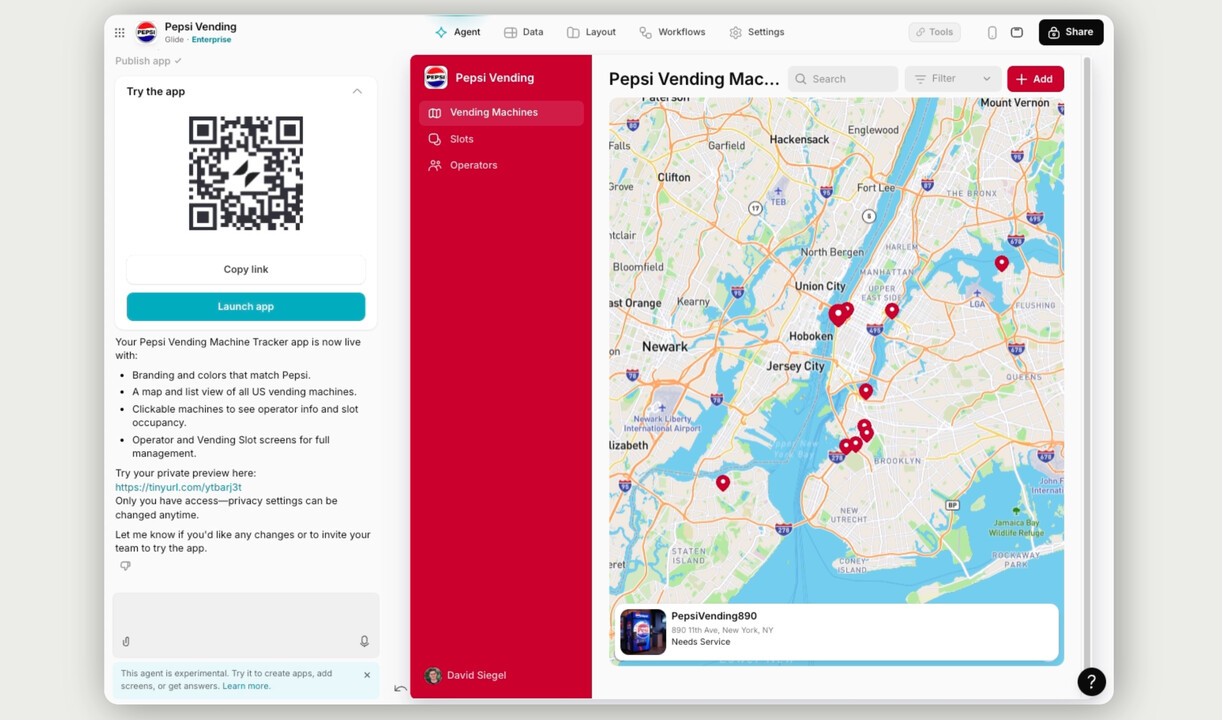
Glide Demos AI Builder That Goes From Prompt to App in 90 Seconds
Glide has showcased a new capability in its AI builder that generates functional business applications from natural language descriptions in under 90 seconds. In a LinkedIn demonstration, the company built a vending machine management system for Pepsi from a simple text prompt, complete with working interfaces and business logic.
The feature addresses what Glide calls the hardest part of building software: getting started. While the generated apps still require fine-tuning, the AI builder eliminates hours of initial setup by interpreting requirements and structuring data models, screens, and workflows automatically.
Users can start builds in two ways. They can let the AI generate sample data based on their prompt, useful for prototyping or testing concepts before connecting real information. Alternatively, they can upload existing spreadsheets containing business data, and the AI will structure the app around that actual dataset. This second approach lets teams move directly from prompt to production-ready tool using their current data infrastructure.
The AI builder sits within Glide's existing no-code platform, which turns spreadsheets and databases into web and mobile applications. The company has steadily expanded its AI capabilities over the past year, adding features like an AI assistant for documentation and inline templating for dynamic data.
How It Compares to Other AI App Builders
Glide's approach differs from AI-powered development tools like Cursor or Bolt, which generate code that developers can edit. Instead, Glide produces visual applications within its own platform, following the pattern of tools like Bubble and Softr. The output is a configured app, not source code.
The demonstration focused on internal business tools, a category where Glide competes with platforms like Retool and Airtable's interface builder. By automating the initial build phase, Glide aims to lower the barrier for operations teams who need custom software but lack dedicated developers. The resulting apps can connect to existing data sources including Google Sheets, Excel, Airtable, and Supabase.
Glide did not announce pricing changes or availability details in the LinkedIn post. The AI builder appears to be accessible to existing users within the platform's current structure. The company has been vocal about using AI to simplify app development since introducing its first AI features last year.
For small business owners and operations teams evaluating no-code platforms, Glide's AI builder represents a shift toward natural language as a primary interface for software creation. The technology still requires human oversight to refine layouts, logic, and data relationships, but it eliminates the blank canvas problem that often delays internal tool development. Whether this approach scales to complex enterprise applications remains to be seen, but for straightforward operational tools, the speed advantage is clear.
Sources
1 checkedHow we cover tool news: Create With's tool desk drafts these reports with AI from the sources listed above and checks them against those sources before publishing.






 ElevenLabs

 Stripe