Glide
Glide Claude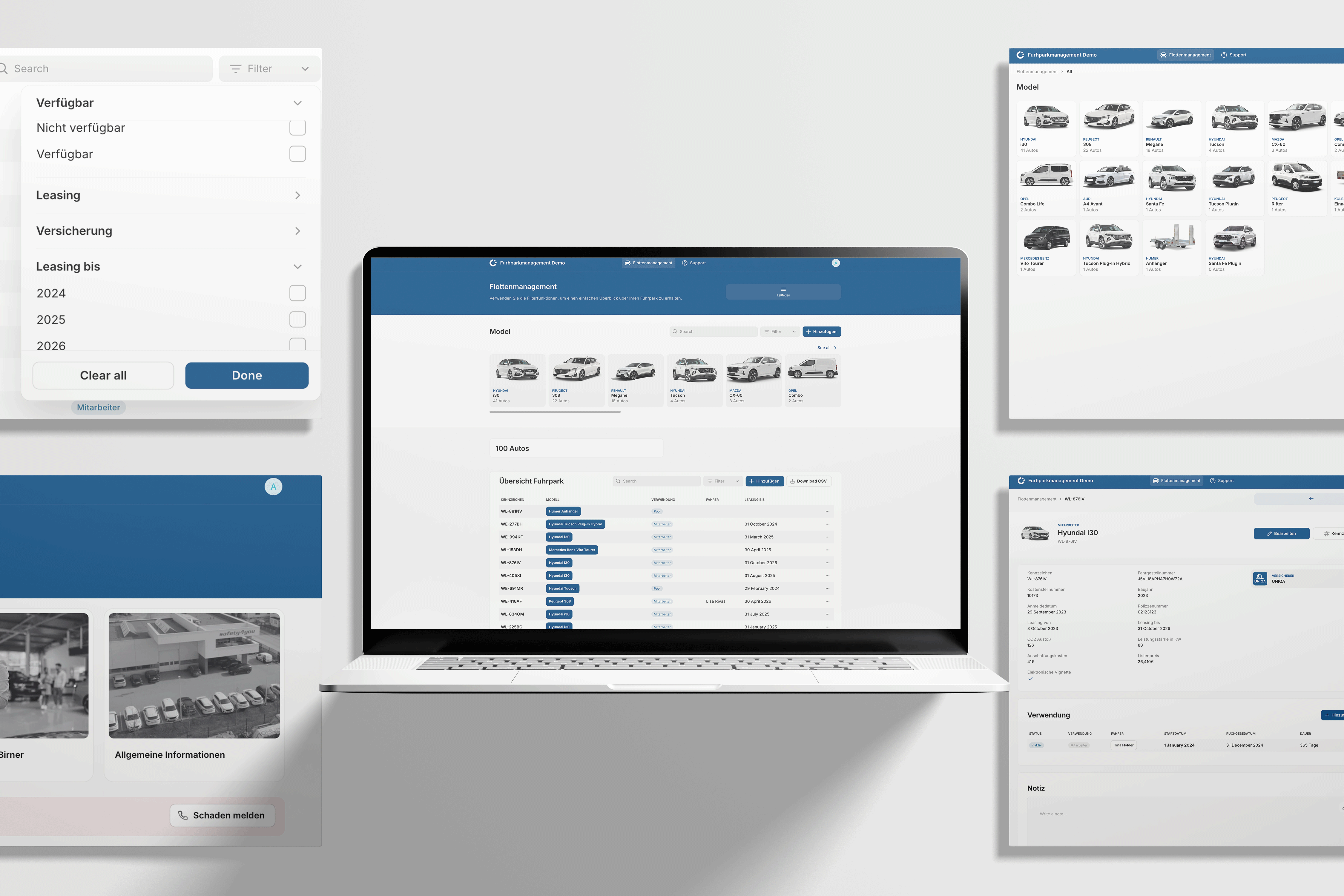
The business
A heavily audited company that ran on Word and Excel
safety4you started in 2010 with about 10 people and now employs between 150 and 200, more in summer than in winter, with 25 in the back office. The work happens on live railway, so almost everything has to be provable, from the protocol for starting a shift to the protocol for an accident on the track.
The company ran the way most growing businesses do. The owner needed something, reached for Microsoft Office, and somebody made a template.
"It's not even using the right functions Excel provides, just duplicating," Alexander says. Twenty years on, the business had 200 employees and everything still lived in Word and Excel.
Alexander wanted to share this case because he thinks companies like this one matter more than the ones usually written about. "90% of all of our economy is made by this type of businesses," he says, meaning medium-sized local firms rather than enterprises or startups.
He estimates around 200 companies in Austria do similar work for the same railway operator. A market that small is unlikely to get specialist software built for it.
Workflow 01 / 05
Fleet management, the project that opened the door
Before
A whiteboard and a set of disconnected Excel files
Every employee needs a car to reach shifts across the country, so the company runs a fleet of around 150 vehicles. This is how it was managed.
- Availability lived on a whiteboard in the office, with plate numbers written up and marked as available or out with a driver.
- Employees reported accidents however they liked, usually by WhatsApp or email, with no standard set of details.
- The accident report was a paper form kept in the car, full of small technical fields. That was hard going for the many workers who don't speak perfect German.
- Mechanics sent their invoices to the back office, where they were paid as bills and never attached to the car that was repaired.
- Car details and damage history sat in Excel files, with claims recorded against the number plate.
Recording claims against the plate caused its own problem, because plates change over a car's life. A claim from five years ago pointed at a plate that had since moved to a different vehicle, so nobody could say which car an old damage belonged to.
What changed
Cars became the second biggest cost in the business
As the company passed 150 employees, the fleet became its largest cost after wages, and the team could see the whiteboard wasn't keeping up. They had also noticed that mechanics were charging them a lot, and nobody had the overview to question it.
The company named fleet management as its own first problem, and Alexander thinks that mattered more than the tool. "I would've never sent them a cold email saying, 'Hey, I can fix your auditing,' because I would've not known the problem," he says.
What he built
One Glide app with a relational database underneath
The team started by getting the data out of the spreadsheets. They imported every car the company had bought and every damage already on record, so the app opened with history in it.
- Each car has a unique ID, so plate numbers can be added and removed over its life while the claims stay attached to the right vehicle.
- Employees link to cars, so a driver's damage history follows them across every car they have driven.
- Repair invoices are uploaded against the car, which puts one vehicle's full repair history in one place for the first time.
- Roles decide what people see. The fleet manager runs it, the back office and the audit team can view it, and employees see only their own cars.
- The insurance broker has his own login, which shows him the damages he needs for claims and none of the other car details.
- Employees get the car rules in the app, next to the documents they have signed. Nobody can say they didn't know the company car wasn't allowed abroad.
The accident report became a digital form on the employee's phone. Alexander's team asked the insurance broker for the minimum he needed, and built the form around that.
Once a claim is digital, the app generates the claim report, checks the required fields are filled in and sends it to the broker.
The audit team then asked for the car handover and return protocols to be digitised too, with official e-signatures. That request was the first sign the app would spread beyond the fleet.
The steps, before and after
Tracking which car is where
Before, whiteboard and ExcelPersonA whiteboard in the office
After, the appPersonIn the app, visible to everyone with access
Reporting an accident
Before, whiteboard and ExcelPersonA paper form or a WhatsApp message
After, the appPersonA guided form on the phone, with photos
Putting a claim together for the broker
Before, whiteboard and ExcelPersonChasing missing details afterwards
After, the appAgent, person approvesThe app builds the report and checks the required fields
Matching a claim to the right car
Before, whiteboard and ExcelPersonBy number plate, which later moved to another car
After, the appAgentThe app keeps it on the car's ID for life
Checking a repair invoice
Before, whiteboard and ExcelPersonThe back office paid it as a bill
After, the appPersonThe fleet manager, with the car's repair history next to it
Handover and return protocols
Before, whiteboard and ExcelPersonOn paper, for the audit file
After, the appPersonIn the app, with an e-signature
The jobs are the same jobs. Who does them, and where the record ends up, has changed.
Stack
What each tool replaced
Job:The app itself, the relational data and the roles
Replaced:A whiteboard, a folder of Excel files and the paper accident form
- DDocsAutomator
Job:Official e-signatures on handover and return protocols
Replaced:Printed protocols signed by hand and filed
That is the whole stack for this module. "I think the tool is not so important, it's more what you want to track," Alexander says.
Effort
Built by an agency, and extended for three years
Build time. The first working version took about three weeks, Alexander says. His team spent the first week on site going through the company's papers and whiteboarding the process, then built a first Glide version quickly, using the existing Excel files as its data.
That was about three years ago, and the app has been extended ever since.
Difficulty, medium. A few weekends for someone comfortable with a no-code tool, if you copy only the fleet module. Here a five-person agency built it and still maintains it, so the client's effort went into explaining how the business works.
Prerequisites. You need a no-code platform with relational data and per-user roles, an e-signature tool for anything an auditor will read, and old data clean enough to import. It also helps to start, as this client did, with one named problem that is costing money.
Result
About €25,000 a year saved on mechanic invoices
- The company saves about €25,000 a year on mechanics. That is Alexander's figure, and the one he offers when asked for hard data.
- The saving comes from questions the fleet manager can now ask. With every invoice sitting against its car, he can see brake discs replaced 5,000km after the last set and ask the mechanic why.
- Claims now reach the broker with the details he asked for, including photos. Claims used to fail because of missing details, though Alexander says nobody can put a figure on what the insurer would have paid.
- Damage history is now continuous for each car and each driver, across plate changes and vehicle swaps. The spreadsheets could not do that at all.
A simple app is worth this much because 150 to 200 people use it. "Super simple, right? But it has the scale," Alexander says.
Reality check
Some of the saving comes from mechanics knowing someone is looking
The question to ask of any system like this is how much of the saving comes from the software and how much from attention. A mechanic who knows his customer now reads every invoice may start charging less, whatever tool the customer uses.
Alexander's answer is that the saving traces to specific invoices being questioned, like a part replaced too soon. Before the app, one person could not track 150 cars, and the fleet manager did not even receive the invoices.
Both effects are likely at work, and both needed the app. The attention only became possible once each invoice sat against its car.
Workflow 02 / 05
The pre-shift safety form that used to arrive by post
Before
Paper forms that reached head office three to five days late
Before every shift, a worker fills in a last-minute risk analysis, confirming he has his equipment, isn't tired and isn't unwell. Once a year the company has to show an auditor that every employee did it.
- The form was paper, filled in wherever the shift started.
- Employees are spread across Austria, hours from headquarters, so they posted the forms in and they arrived three to five days later.
- Some employees collected a stack and dropped it off whenever they passed the office.
- Forms got lost, and forms got wet, because much of this work happens outdoors in winter.
- Handwriting varied, so where an employee had given a reason for a missing item, the reason could not always be read.
With paper the records could never be complete. Alexander says the company had accepted the fines that came with that.
What changed
Employees already had the app on their phones
Employees were already using the app for their cars, so the audit team asked whether the risk analysis could go in it too. It became a second tab in something every employee already had.
What he built
One tab for employees and one filtered view for the auditor
- The form is a tab in the app employees already have, filled in on a phone at the start of a shift.
- A missing item needs a reason, which is captured as typed text.
- The auditor has his own role and a live view, so records appear as they are completed.
- He can filter the list. Seeing every form from the last three days where someone reported a missing item now takes one click.
The steps, before and after
Filling in the pre-shift check
Before, paperPersonOn paper, outdoors, in any weather
After, the appPersonA phone form at the start of the shift
Getting the form to head office
Before, paperPersonPosted, or delivered in batches
After, the appGoneThe record is live when it is submitted
Reading the reason for a missing item
Before, paperPersonIf the handwriting allowed
After, the appPersonTyped text in the record
Finding incomplete records
Before, paperPersonAt the yearly audit, if at all
After, the appPersonThe auditor filters for them the same week
Proving compliance at audit
Before, paperPersonAssembling paper, with gaps
After, the appPersonExported from live data
Stack
One tool, already in place
Job:The form, the auditor's role and the filtered list
Replaced:Paper forms and the post
Effort
Small, because the foundations were already there
Build time. Alexander describes it as small next to the fleet build. The employee app, the employee database and the roles all existed already.
Difficulty, easy. A weekend, no code, connecting things you already pay for. It is a form and a filtered list on a platform already in production.
Prerequisites. You need an app your staff already have on their phones. The second workflow was cheap because the first one paid for the foundations.
Result
Records arrive the same day
- Submissions are live, where they used to be three to five days old. None of them is lost, unreadable or rained on.
- The auditor can find a missed item within days. The paper system showed problems at the yearly audit or never.
- The time saved here is counted inside the 700 hours. Alexander has no separate figure for this module, or for the fines avoided.
Reality check
A form on a phone is still a form
A sceptic would say that moving a compliance form to a phone makes nobody safer. A checklist tapped through on a screen can be as thoughtless as one scribbled on paper.
The change is in what the company can prove and how quickly it can act. A missed item now reaches the auditor the same week, and the company has complete records to show at audit.
Context
The honest bit: a company that outsources its software depends on the builder
The strongest objection to any business that has its software built by someone else is dependence. Here a company of 200 people runs its fleet, safety records, audits, recruitment and training on apps built and maintained by a five-person agency.
Take that seriously if you are in the same position, whether your builder is an agency, a freelancer or one internal developer. safety4you's setup answers it in three ways.
The platform is a commercial no-code product. The app and its data live in Glide, which other agencies and freelancers also build on, so another builder could pick it up.
Requests go through a ticket system. Ideas and problems are written down, so the reasoning behind each feature is on record.
The client has learned to describe its own processes. The first build was difficult because people could say what they did but not why, or which steps were law and which were habit. Alexander says every head of department he works with has got better at this.
That third point is worth copying whoever builds your software. "It forces them to write it down," Alexander says of the ticket system, and a business that can explain its own processes can brief any builder.
Context
The money: 700 hours a year, plus €25,000 on repairs
Alexander calculates that the apps save roughly 700 hours a year of back-office time across every module. At an average Austrian employment cost he values that at €45,000 to €50,000 a year, and both figures are his own calculation.
The €25,000 a year on mechanic invoices sits on top of that. He keeps it separate because it traces to specific invoices.
He counts only what he can measure. "In terms of cost saving for less errors on the audit, what damage of mechanics, that's all hard to measure, but just time saving is around 700 hours," he says.
The company also avoided buying software. Alexander priced the alternatives himself, and puts an enterprise fleet tool at a few hundred euros a month and specialist risk analysis and audit tools at €3,000 to €5,000 a month.
Price is only part of his case for building. Four or five separate tools would have kept the data in four or five places, so nobody could see one employee's cars, damages, safety checks and training together.
A company like this would also struggle to shop for software in the first place. "They would have not known what to look for," he says, because the processes had never been written down.
His advice
What he'd tell you to copy
Start with one problem that has money attached. Fleet was the second biggest cost in the business, and a win there earned the trust for everything since. "It worked because we found a specific example like the fleet management, and then you have a little win, then you can move forward."
Let the next department come to you. The audit team saw the fleet app and asked for car protocols, then the risk analysis, then their own audit module. "They just come with ideas suddenly," he says, "and then it just becomes this loop."
Make people write it down. The hardest part of the first build was learning why each step existed. A ticket system that makes people describe the problem in writing has made every later build easier.
Keep the use cases small. "None of them are crazy use cases. None of them is technically super complex. They all solve a specific problem."
Ask one question to get started. Alexander's opener for a business like this is to ask for one thing they still do the way they did it years ago. He then shows how it could be done, and they find the rest together.
Case studies are published to help readers understand how other organisations approached a problem. They are not endorsements of a tool or a vendor, and one company's result is not a forecast of yours.
Create With Plus · 3 more workflows from this case
14 min moreThere's more to this one.
The rest of this case study covers three more workflows in full: the AI agent that reads the fuel card reports against a €30,000 monthly fuel bill, the audit module that replaced ten OneDrive folders, and the training centre that stopped printing 100-page course packs. It also shows the single employee record that ties them together.
Workflow 3 of 5
The AI agent that reads the fuel card reports
The fuel card provider sends a report every 14 days listing every fill-up across the fleet, and each employee enters their odometer reading at the pump. Somebody in the back office read that list line by line.
Workflow 4 of 5
The audit module that replaced ten OneDrive folders
The company's internal auditor keeps around ten subjects ready for audit, from the pre-shift risk analysis to how the office manages its waste.
Workflow 5 of 5
The training centre that stopped printing
Course material was printed for every student, at about 100 pages each. Course admin lived in Excel files, like everything else. The trainer collected signatures on paper on the last day. He then went upstairs to the back office, where the certificates were typed in Word and printed. Students sat and waited 30 to 45 minutes for their certificate at the end of the course.
Everything above this point is free on every case study we publish.