Supabase
 Vercel
The business
An adviser who wanted her method in an app
The adviser helps families get control of their money, whether that's paying off debt or making ends meet. Her method starts with four lists, covering what they owe, what they own, what they spend and what they earn, then turns them into a budget and tracks the family against it.
She wanted three things from an app, in this order:
- Help her own clients.
- Give it to other advisers to use with their clients.
- Turn it into a standalone app that anyone could use without an adviser.
She also runs free programmes, including a monthly lecture, so she has a wider community of people who are not paying clients. Several advisers now work with her and use the system too.
Edo thinks this kind of founder makes a better client than most startups. "There's this type of founders who are experts in their field, and then they want to digitise that expertise," he says, and an app that supports the founder's own business has a better chance of succeeding.
Workflow 01 / 04
Daily spending by WhatsApp instead of a shared spreadsheet
Before
A spreadsheet template that every family had to keep filling in
- Each family got a copy of her spreadsheet template in Google Drive, so she could see what was going on and help.
- She loaded their statements with them by hand. She went through all their bank statements with each family on calls of about two hours, from her own time.
- Families recorded every expense in the spreadsheet, which meant opening the template and finding the right row every time they spent money.
- The adviser checked the sheets herself to see who was over budget and where.
- She did the chasing. Prompts to plan the next week or review the month came from her.
Edo calls the spreadsheet "an overhead and a huge friction" for both sides.
What changed
She wanted families to notice their spending as it happened
The adviser wanted logging a daily expense to be easy, so that families would become more aware of what they spent. Edo offered to build an app that put WhatsApp first, since that was where her clients already were every day.
What Edo built: a WhatsApp channel for every day and a desktop app for the rest
- Each family has the app's WhatsApp number alongside a desktop app, which handles the bigger jobs like uploading statements.
- Statements are uploaded in the desktop app, where they are analysed with a mix of manual work and some AI and turned into the family's budget. The planned onboarding agent in workflow 2 will take this over.
- A family logs one or several expenses in one message. A short typed message, like "shopping 500", goes straight in with no AI involved, and anything else goes to an AI model that works out what they meant, so families don't have to learn a format.
- The app replies after every expense with how much is left in that category, or a warning that the category is over.
- Scheduled messages do the chasing. At the end of each week the app asks the family to plan the next one, and it does the same at the end of the month or when a category passes a set amount. One tap opens the plan to edit.
The AI layer came after the first version. With it, families can write freely, record a voice message or send a photo of a receipt, and the AI recognises the shop and the products and records the expense.
The AI also tells an expense from an income or from a question about their finances. It offers a category when it meets a merchant it hasn't seen before.
Edo kept the AI's job as small as possible. "This is financial data, so you don't want AI handling everything," he says, so the code handles every message it can understand and the AI only sees the rest.
The steps, before and after
Loading the family's statements
Before, the spreadsheetPersonThe adviser, on a two-hour call
After, the app**Person, with some AI.** Uploaded in the app, then analysed with manual work and some AI
Recording spending
Before, the spreadsheetPersonTyped into the template
After, the appPersonOne WhatsApp message, voice message or receipt photo
Putting it in the right category
Before, the spreadsheetPersonBy finding the right row
After, the appAgentCode for short typed messages, AI for free text, voice and photos, with a suggestion for anything new
Telling the family what's left
Before, the spreadsheetPersonThe adviser, reading the sheet
After, the appAgentA reply after every expense
Prompting the weekly and monthly plan
Before, the spreadsheetPersonThe adviser
After, the appAgentScheduled WhatsApp messages
Stack
What each tool replaced
- WWhatsApp, through Meta's Cloud API
Job:The family's daily channel for expenses, replies and reminders
Replaced:Opening a spreadsheet template
Job:The database, the back-end functions and the scheduled jobs that send reminders
Replaced:A spreadsheet per family in Google Drive, and the adviser's own reminders
- RReact, hosted on Vercel
Job:The desktop app for uploads, budgets and the adviser view
Replaced:The spreadsheet as the main view
- AAn AI model
Job:Reading messages the code can't parse, voice messages and receipt photos, and suggesting categories
Replaced:Nothing, this job is new
- CClaude Code
Job:Writing the app's code, with Edo making the design decisions
Replaced:Writing every line by hand
Every incoming message, outgoing message and AI call goes into a queue before it is processed. Supabase's back-end functions stop after 400 seconds on the paid plan, so a job that got stuck without a queue could lose a family's message.
Effort
Three months to a first version, improved ever since
Build time. Edo started designing the app in August 2025 and building it in late October, and the first version launched in late January 2026. A product manager and a second developer were on the team for part of that time.
Difficulty, hard. It took an experienced developer three months to get WhatsApp, a database, scheduled jobs and AI working together. A no-code version of the core idea, a WhatsApp message that adds a row to a sheet, is a medium build.
Prerequisites. You need a WhatsApp Business account connected through Meta's Cloud API, a database that can run scheduled jobs, and an AI model for the messages code can't read. You also need to be comfortable directing an AI coding agent and reading what it writes.
Result
A WhatsApp message instead of a spreadsheet row
- Families log an expense, or several at once, in one WhatsApp message, where they used to open a spreadsheet and find the right row.
- Families are much happier reporting expenses by WhatsApp than in the old spreadsheet.
- The adviser saves about two hours a week on reviewing families' financial data before meetings. This is an estimate, not a tracked figure.
- Advisers see a family's numbers more clearly than in the spreadsheet, and can ask the app questions about them before they talk to the family.
- Families pay to use it. The paid tier has been live since early September 2026.
Reality check
An app has to keep people accountable without a person
Any app that takes over part of a human adviser's job raises a question of accountability. A family that has paid to meet their adviser next week tries harder than a family with an app, and Edo raises this point himself.
Edo answers that the app reaches out first. It already sends weekly, monthly and over-budget messages, and the plan is for it to notice patterns and start conversations the way she does, like "it's getting close to the end of the month, and you've already spent this much in this category, want to talk about it?"
For now the app works alongside her advisers rather than replacing them, and the reminders take over the routine chasing.
Workflow 02 / 04
The onboarding agent that builds a family's first budget
Before
Hours of statement work for every new family
- A new family's statements needed reading line by line, first by the adviser on her two-hour calls, then in the app as manual work mixed with some AI to read the files.
- Every transaction needed a category, which meant sorting merchants one by one.
- Commitments and assets had to be picked out by hand, including loans, the mortgage and card purchases paid in instalments.
- The budget was built from all of that, so a family waited for the whole job before seeing the full picture.
- Onboarding takes about three hours today, and families can't complete it on their own.
What changed
A 30-day free trial
The app offers new families 30 days free, and not every family stays after that. Edo estimates that a regular AI agent reading all of a family's files and chatting with them "can cost several dollars" in AI usage per family, which adds up fast for people who may never pay.
What Edo is building: a chat agent where code asks most of the questions
The onboarding agent is planned functionality and isn't live yet. This is how Edo has designed it to work.
- The family uploads everything at once in the desktop app, whether that's bank statements, card statements or loan documents.
- AI reads the files and pulls out the transactions.
- Code builds a ledger of every transaction and works through it, sorting commitments, assets, instalments and merchants into categories.
- It works through three months of a family's money. That covers expenses, commitments, assets and income, in about 25 back-end steps of file and data analysis that mix code and AI.
- It looks up each merchant on the bank statements and saves it, so the app recognises it next time.
- Code asks most of the questions. Depending on the family's data, the agent has up to 45 topics to resolve, with up to 60 possible questions, and code rather than AI poses most of them.
- AI steps in only where code can't decide, like a merchant it doesn't recognise or an answer in the family's own words.
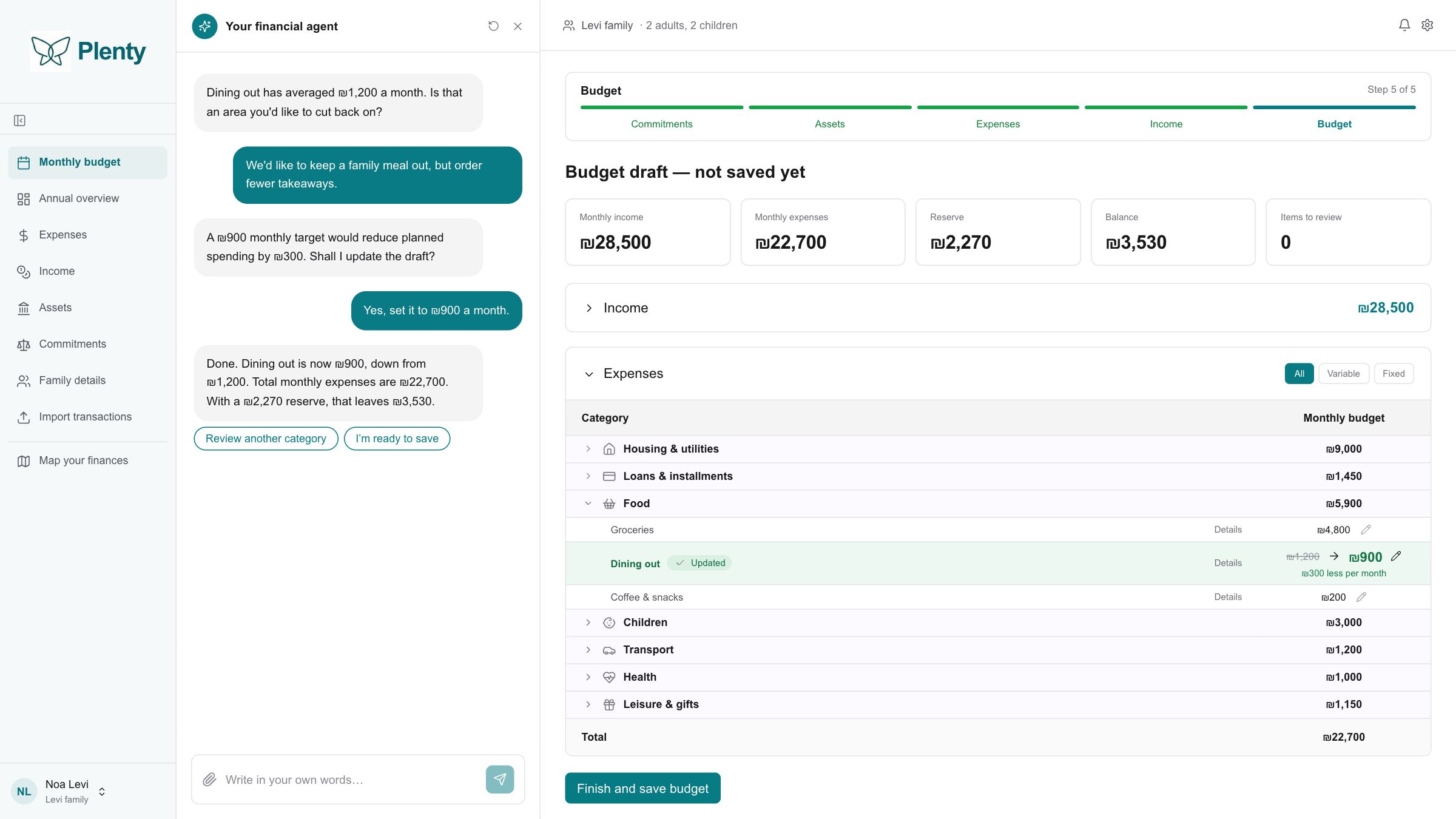
- It offers a first budget built from the family's expenses and income and the adviser's own budgeting rules.
- The family approves every item before it goes into the budget, step by step through commitments, assets, expenses, income and the budget itself.
"Whatever I can do in code, I did in code. Whatever is not in code, the AI does," Edo says.
The same agent is designed to stay useful after onboarding. At the end of a month a family will be able to upload their statements again, and the agent will reconcile them against what they reported by WhatsApp and show what was missed or has changed.
The steps, before and after
Reading the statements
Before, manual work and some AIPersonWith some AI help
After, the planned agentAgentAI reads the files
Building the transaction list
Before, manual work and some AIPersonBy hand
After, the planned agentAgentCode builds a ledger
Sorting commitments, assets and merchants
Before, manual work and some AIPersonOne by one
After, the planned agentAgent, person approvesCode first, AI for the rest, the family approves each item
Asking the family what's missing
Before, manual work and some AIPersonOn a call
After, the planned agentAgentQuestions written in code, AI for free-text answers
Building the first budget
Before, manual work and some AIPersonThe adviser
After, the planned agentAgent, person approvesA draft the family edits and saves
Stack
The same app, with a new agent
- AAn AI model
Job:Reading the uploaded files, and answering what code can't
Replaced:Reading statements by hand
Job:The ledger, and the code that sorts it and writes most of the questions
Replaced:Manual sorting and categorising
- RReact, hosted on Vercel
Job:The chat and the five-step screens the family approves in
Replaced:A call with the adviser
Effort
Two months so far, through several rebuilds
Build time. The agent has taken two months so far. Edo built and tore it down several times, and improved the architecture with every build.
Difficulty, hard. Edo calls the onboarding agent "a very complex architecture", mostly code with AI for anything ambiguous and for the conversation itself. Deciding which steps code can do and which need AI was, in his words, "a lot of architectural work" that he had to think through rather than leave to the AI.
Prerequisites. You need financial data already structured in a database, a clear set of categories, and a list of the questions an adviser would ask a new client.
Result
Onboarding expected to drop from three hours to 30 minutes
- Onboarding should take about 30 minutes once the agent is ready, down from about three hours today.
- Families will be able to do it themselves, which they can't today.
- AI is used only where it is needed, which keeps the cost of each free trial down.
- The code answers immediately, so a family won't wait for an AI model to call its tools before seeing the next question.
- The sums come from code, so the budget adds up every time.
- The standalone version waits on it. The adviser plans to open the app to people without an adviser once the agent is finished.
Reality check
Too new to have a record
The agent is still planned, so it has no track record yet. Any AI that reads financial documents raises the question of what happens when it misreads one.
In Edo's design, every item the agent proposes shows the file it came from and a confidence level, and nothing goes into the budget until the family approves it or edits it.
Context
The honest bit: families' bank statements in an app written with AI
Security is the strongest objection to an app like this. The app holds families' bank statements, loans and spending, and an AI coding agent wrote much of the code.
Take this seriously if you are building anything that holds other people's data, whoever or whatever writes the code. Edo's approach has four parts.
Know the law first. Edo starts with the privacy rules where the app operates, then decides what data needs protecting and how.
Every change is reviewed before it ships. Changes go in as pull requests, two AI code reviewers check them, and each one is tested in its own feature copy of the app. A final regression check runs in a staging copy before anything goes live, and he reviews important changes personally.
The AI parts are checked against a published list of risks. He uses the OWASP list of security risks for AI systems, which covers attacks like a user tricking the app into revealing its instructions or another family's data.
Each adviser sees only their own families. The database enforces it, and wider access, like the lead adviser seeing every family, is being checked against privacy rules before it is switched on.
Edo doesn't treat AI-written code as riskier than human code. "Humans make as many mistakes and as many bugs as AI," he says, and both need the same tests and reviews.
Context
The money: paying users within six weeks
The paid tier launched in early September 2026, about six weeks before the interview, and the app already has paying users. New families get 30 days free first.
The standalone version has not launched yet. Paying users so far come from the adviser's free community, her former clients and other advisers who use the app with their own clients.
Edo is clear that the standalone version is the real test. Changing how people manage money is hard, even for a family in debt, and an app has to do it without an adviser in the room.
His advice
Edo's advice: what to copy
Put everything you can in code, and give AI what's left. Code is faster, cheaper and always gets the sums right. "AI participates only when it's really necessary," he says.
Stay in charge of the architecture. No written spec or set of rules lets you hand an AI the critical design decisions in a complicated system, he says, so you have to ask it the right questions.
Edo compares it to a plumber looking for a leak under the floor. If you don't have the sense to ask why he's taking apart that wall, you end up with every wall and floor opened up, and a lot of time and money spent.
Building for other people needs a release process. "If you're building something for yourself, that's fine. You're not accountable to anybody, and you can suffer the bugs," he says. Once other people use it, every change needs reviewing and testing before it reaches them.
Manage AI like a team. "Once you work with these things, you're like a development manager. You have employees, and you need to make sure that the employees deliver properly."
If you build for clients, pick experts. He prefers founders who want to turn their own expertise into software over first-time startup founders, because the app supports a business that already works.
Case studies are published to help readers understand how other organisations approached a problem. They are not endorsements of a tool or a vendor, and one company's result is not a forecast of yours.
Create With Plus · 2 more workflows from this case
8 min moreThere's more to this one.
The rest of this case study covers two more workflows in full: the adviser view, where each adviser can question a family's numbers in a chat and sees only their own families, and the release process every change goes through before it reaches a paying family, including the WhatsApp glitch that taught Edo to stress test.
Workflow 3 of 4
The adviser view, where advisers question a family's numbers
The adviser opened each family's spreadsheet in Google Drive to see how they were doing. Making sense of the numbers was her job, from whatever layout the family had left the sheet in. Only she could do it. The method lived in her template and her head, so it couldn't easily pass to other advisers.
Workflow 4 of 4
The release process every change goes through
AI writes confidently even when it's wrong, filling any gap in what it knows with something that sounds plausible. Back-end functions stop after a time limit. On Supabase's paid plan that is 400 seconds, and a job waiting on an AI reply can be cut off with a family's message in it. Some bugs hide for months, until a new user does something nobody expected. AI features add new kinds of attack, like a user asking the app to reveal its instructions or another family's data.
Everything above this point is free on every case study we publish.