 Granola
 Circle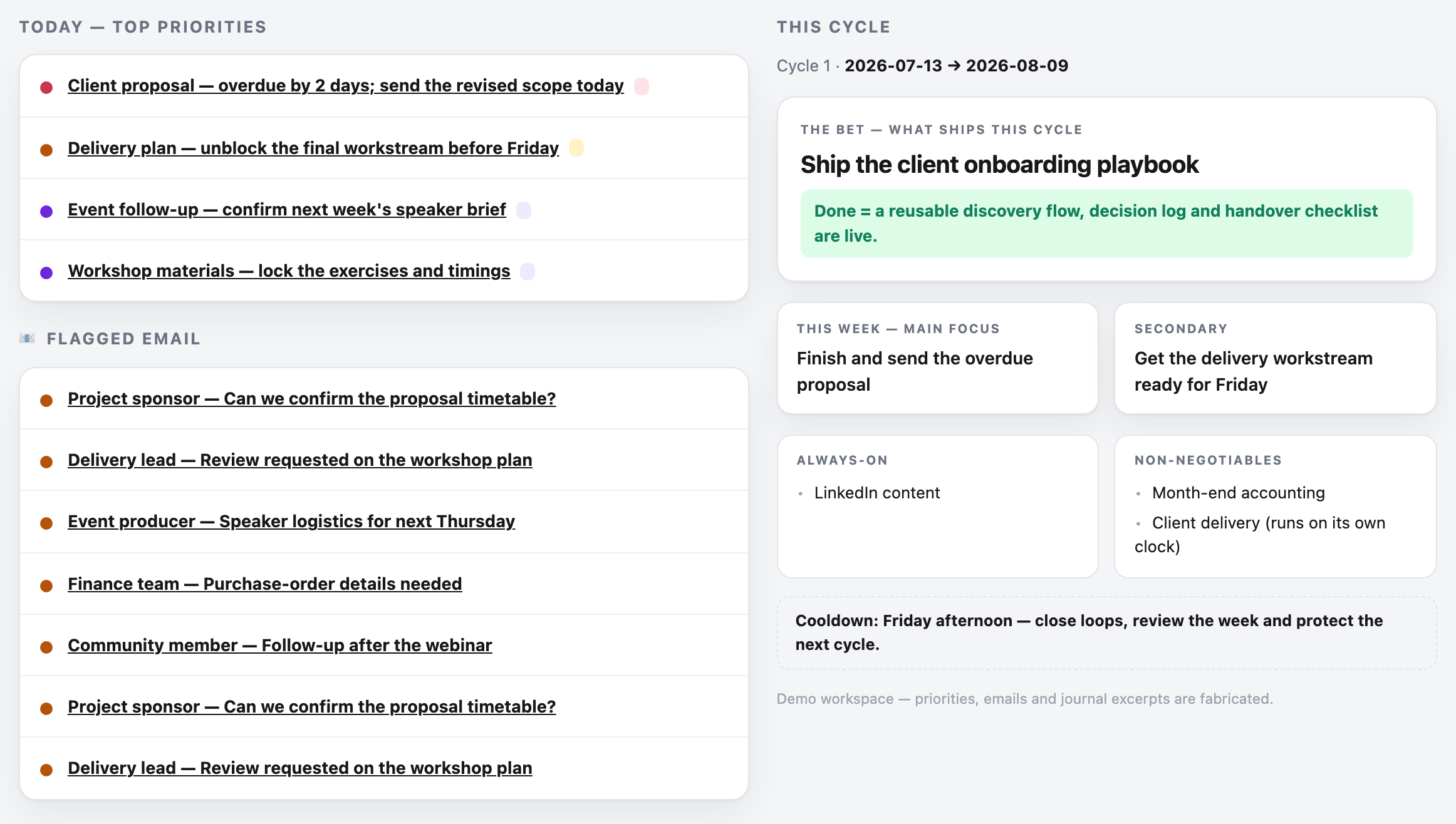
The business
Every job in the company is his
Nick describes himself as somewhere between a freelancer and a business. It's just him, but he doesn't only sell his time, consulting engagements with big enterprises sit alongside training programmes, referral deals and collaborations with other freelancers.
The consulting is advisory work, helping enterprises find where to invest in AI, and sometimes hands-on product work, like shaping what an automated compliance process should look like for an insurance company. The training teaches commercial and product thinking to technical people who never went to business school, and lately it has grown a strand of AI training, because people saw him demo this system and asked him to teach their teams to work the same way.
Around the paid work sits a community for data and AI product people, with in-person meetups across London, Barcelona and Paris, and about 1,500 people on the mailing list. It makes no money directly, he calls it top of funnel, and his sales cycles run 6 to 18 months, which matters for what he built.
The virtual side of it has grown sharply. He is on course for around 33 online community events in 2026, against 8 held in 2025, a programme he says he could not run alongside client work without the automation.
As he puts it, "my job is to do every job in my company." The system reduces the manual work across those jobs, while Nick directs the work and reviews important outputs.
Workflow 01 / 05
One repo of markdown files that runs the whole business
Before
Curated context that went stale
Nick was already a heavy AI user before this. He ran his work through ChatGPT and Claude Projects, one project per topic, each loaded with instructions and examples by hand.
- He curated context once, and it decayed. His LinkedIn project held his tone-of-voice rules and favourite posts, uploaded when he set it up, and two years later it was still writing from those two-year-old references, because after every good post he was never going to copy it out and re-upload it.
- He fixed outputs instead of instructions. Conversations ran "no, that's not what I meant, do it like that, I also explained this last time", and the same corrections repeated week after week.
- The projects couldn't share what they knew. His course frameworks feed his consulting, and his consulting produces the stories that improve the course and his posts, but Claude Projects are siloed by design, so none of that context could flow.
- The CRM lived in his head. Notes on what a prospect cared about existed only for the biggest stakeholders, because keeping them for everyone was tedious, and with sales cycles of 6 to 18 months, details were long gone by the time a prospect came back.
- Transcripts were an occasional export. He used an AI notetaker, but only pulled transcripts into Claude for the big meetings, so most calls left nothing behind.
The deeper cost sat underneath the repeated corrections. Whole categories of work made no sense to hand to AI at all, because fixing the result took longer than doing the job.
What changed
Claude Code arrived and Nick dived in
Claude Code came out and Nick picked it up, in his words, very aggressively, in February 2026. A decade working alongside data scientists and engineers gave him a frame for using a non-deterministic tool.
His frame is that you can't test such a system into being always right, you work out the cost of it being wrong and design around that.
"It feels crazy that I've not worked with it my whole life now," he says.
What he built
The personal operating system
The core business context lives in one repo of markdown files, which he views through Obsidian and works on through Claude Code or Codex. A global CLAUDE.md file sets the rules, and cascades down into more specific ones.
- Context stays fresh on its own. Every call transcript syncs into the repo automatically through Granola's Obsidian plugin, and rules tell the AI what to update after each call. Nothing waits for him to curate it.
- Instructions get fixed, not outputs. When something goes wrong, he asks what rule needs to change so it never happens again, and the rule gets rewritten. "When a mistake happens, we fix the root cause. We don't just fix the symptom."
- Everything shares one brain, with walls where they matter. Each client or internal project has a folder with its own CLAUDE.md, so he can say "I just got off the phone, update the proposal accordingly" and it knows exactly who and what he means, while work for one client can't leak into another's documents.
- The CRM writes itself. A folder holds a markdown note per company, person and opportunity, and he never edits them by hand. After every call the log updates, and the template captures what each person cares about and the metric they're judged on, so a proposal for a marketing lead talks conversion rates and one for a finance lead talks profit. When a prospect resurfaces after six months, he asks for the exact words they used to describe their problem, and writes the next email in them.
- Tasks write themselves too. Each task is a markdown note the AI creates, with status, priority, due date, an AI-estimated duration and links to the relevant files, under a standing rule that anything the AI can start, it starts. If he promises an introduction on a call, the intro is drafted before he asks.
- He approves anything that leaves the building. Drafted emails land in his Gmail drafts folder, and he reads and presses send. For simple introductions, where the CRM knows both people, that review takes a glance.
- The day starts with a brief. The AI writes a daily brief of top priorities, important emails and anything overdue, and a shorter version arrives as a Telegram message each morning. He has ADHD and a billion tabs open at any moment, he says, and the brief is what pulls him back to the thing that matters.
The whole vault syncs through Obsidian Sync and Git. Git earns its place because it lets the AI trace exactly what changed, roll anything back, and run parallel agents on different parts of the vault without them clashing.
The view on top: from Obsidian to a dashboard he had built
The files are the system, and what has changed over the year is how he looks at them.
Everything above is what he calls the initial version, which was Obsidian and nothing else, every note read and edited in the app. The screenshots so far are that layer, and he still uses Obsidian, just less than he did.
The shift started with one-off requests. He would ask for a plan as an HTML page rather than a wall of text, because it was easier to take in at a glance.
Those one-off pages became permanent. He now has a local web app that starts up with his laptop, with a module for each part of the business, and it is where he reads most of what the system produces.
- The dashboard is the daily brief made visual. Top priorities, flagged email, anything overdue, and the objective for the current cycle.
- The CRM module shows the pipeline, what's in flight, what needs a proposal and the total value, all read from the markdown notes underneath.
- The community views are why he didn't buy a CRM. He says he'd have paid for HubSpot if a pipeline was all he needed, but he also tracks webinar guests, meetup sponsors and guest article contributions, so he had the AI build views for those instead.
- A demo mode swaps in randomised data, which took about five minutes to build, and is what let him walk us through all of this without showing a single client's details.
The app reads the same markdown, with a local SQL database for data that doesn't suit notes, like his synced bank transactions. AI-built code powers the dashboard and integrations.
Running a local server sounds like a thing that breaks, and in the first month it did, with the app shutting itself down after periods of inactivity. He fixed the cause rather than restarting it each time, moving it to a Launch Agent that keeps it running.
The steps, before and after
Capturing call transcripts
Before, Claude Projects eraPersonExported by hand, big meetings only
After, February 2026 onAgentEvery call syncs in automatically
Keeping the CRM current
Before, Claude Projects eraPersonHis memory, plus notes for top stakeholders
After, February 2026 onAgentUpdated after every call under written rules
Capturing tasks
Before, Claude Projects eraPersonWhatever he remembered to write down
After, February 2026 onAgentCreated from calls and emails, with metadata
Planning the day
Before, Claude Projects eraPersonAfter, February 2026 onAgentDaily brief, plus a Telegram summary each morning
Drafting emails and intros
Before, Claude Projects eraPersonAfter, February 2026 onAgent, person approvesDrafts land in Gmail, he presses send
Starting promised work
Before, Claude Projects eraPersonWhen he got round to it
After, February 2026 onAgentA standing rule says start anything you can start
The jobs didn't change. Who does them did.
Stack
What each tool replaced
- CClaude Code / Codex
Job:Runs every process in the repo
Replaced:Claude Projects, and a dozen separate app visits
- OObsidian
Job:Viewing and lightly editing the markdown vault
Replaced:Nothing, it's a window onto the files
- OObsidian Sync + Git
Job:Sync, history, parallel agents
Replaced:Manual version anxiety
- GGranola + Obsidian plugin
Job:Every call transcript, synced automatically
Replaced:An AI notetaker and hand exports
- WWispr Flow
Job:Voice input at roughly 3 times his typing speed
Replaced:Typing, and with it, thin instructions
- TTelegram bot
Job:Morning brief out, quick thoughts in
Replaced:Nothing
- GGmail drafts
Job:The approval layer for outgoing email
Replaced:Nothing, it was already there
- AA local web app, run by a Launch Agent
Job:Dashboard, CRM and community views on his own machine
Replaced:A CRM subscription, and reading raw folders
- AA local SQL database
Job:Bank transactions and other structured data
Replaced:Nothing
Effort
Seven months of small additions, and counting
Build time. There was no big build. He started in February 2026 and has added to it continuously since, module by module, keeping what earns its place.
His test is blunt, "adoption is the real test of whether something is good," and anything he stops using gets changed or killed, because unused modules are bloat that makes the rest worse. We've asked for his estimate of the total hours invested.
Difficulty, hard. Months of iteration, and you have to enjoy it. He plainly does.
Prerequisites. A Claude Code or Codex subscription, comfort living in plain-text files, and one habit that matters more than any tool, treating every annoyance as a broken rule to fix rather than a bad output to correct. His decade working alongside data and AI teams shaped the mindset, and the foundation itself is markdown notes and plain-language rules, with AI-built code for the dashboard and integrations.
Result
2.4 times the monthly revenue, and delivery effort down about 45%
The figures below are Nick's own, sent after the interview. The percentages are his estimates rather than tracked measurements, and he says so.
- Average monthly revenue in the first half of 2026 ran at 2.4 times the 2025 monthly average. That is from his own revenue figures.
- On one engagement he estimates AI cut delivery effort by about 45%. The system kept track of a large amount of stakeholder and project information at a level of detail he says he would have struggled to sustain otherwise.
- He could turn stakeholder feedback into an updated prototype about two hours later, built in Lovable. The combination of that detail and that speed has produced referrals and follow-on work, he says.
Where the hours went. These are his estimates of hands-on time, before and after.
| Job | Before | After | His estimate |
|---|---|---|---|
| Updating a training module, including video editing | About 8 hours | Under 2 hours | About 75% less |
| An event banner and its descriptions | About 40 minutes | About 5 minutes | About 88% less, which he estimates would save roughly 25 hours a year at the planned event volume |
| Preparing a proposal | About 4 hours | About 30 minutes | About 88% less |
Speed matters more to him than the hours. Proposals now go out within zero to two days instead of one to two weeks, which means reaching an opportunity while it is still warm. Events get published sooner too, so guests have more notice and more time to sign up.
- He puts £200,000 to £300,000 of pipeline down to the system. That is AI upskilling and operating-model work he says arose specifically through the personal OS and the conversations it started, on top of a decade of enterprise data and AI experience.
- Tasks that weren't worth delegating now are. The old maths, where fixing AI's work took longer than doing the job, has flipped, he says.
- 99% of his work happens in one interface, his estimate, instead of a round trip through a design tool, a chat window and half a dozen tabs.
The revenue picture. The 2.4 times figure is real and his own, and he is careful about what it proves. Some of it is a young business growing, he says, and some of it reflects the extra capacity and quality he has been able to deliver.
Reality check
Plain files are what make the dependence safe
The strongest objection to any business run this way is dependence. When an AI organises the files, names them and runs the processes, the owner comes to rely on a system they no longer navigate by hand, and a filename that's efficient for a machine means nothing to a person looking for it.
Nick's answer has two parts. The core business context is plain markdown in a Git repo, synced twice over and readable by any human, any editor and any model, so nothing about it is locked in.
He also keeps two AI vendors interchangeable, on Codex these weeks, back on Claude when it suits, so an outage or an account problem at one of them can't take the business down.
He treats the system with suspicion on principle. When he spotted a made-up surname in a reasoning step, on a job whose final output was correct, he chased it anyway, and the rules were rewritten so the AI never invents personal details, always checks the CRM, and asks him when someone is unknown or ambiguous.
"It pays off to treat the system with suspicion," he says. Fixing the rule rather than the output is how the system gets better, and he is blunt that it has not made the problem go away, "it still makes mistakes".
So he keeps himself in the loop by design. He directs the work, checks the claims that matter and approves anything that goes outside the business.
Workflow 02 / 05
Webinars that publish themselves
Before
Two platforms, three calendars, and a dependency trap
Every webinar is hosted on Circle, his community platform, and promoted through Luma, where his meetup mailing lists live. Publishing one meant a chain of small manual jobs.
- He made a landscape banner in Canva at Circle's required dimensions.
- He made a separate square image because Luma's format is different.
- He wrote the Circle description to the community's usual format.
- He rewrote it for Luma, where readers might not know the community, so it needed joining instructions and an explanation of what the community is.
- He checked every link and published the event to the London, Barcelona and Paris calendars, one by one.
The tedium was half the problem, and sequence was the other half, because none of it could start until the guest confirmed their photo, bio and title. He'd set aside a Thursday to prepare webinars and get stuck waiting, and by the time a guest confirmed he'd be busy with client work, so invitations went out last minute and too few people joined.
What changed
The bottleneck was him, and it no longer needed to be
Once the personal OS existed, the webinar process was a folder of written SOPs away from automating. The AI already knew every guest from the CRM, and every step was a rule it could follow.
What he built
One confirmation triggers everything
Now, when a guest confirms their title, he tells the system it has everything it needs. It generates the banner and the square image, drafts both descriptions, and waits.
He checks one thing, the banner, mostly that the guest's photo looks right. Then he says publish, and the event goes up on Circle and on all three Luma calendars, with the right links.
The connection runs through the Luma and Circle APIs, with one exception. Luma's API wouldn't update the event thumbnail, which used to be a manual step he kept for himself.
Now the AI does that step through the browser, a small, self-contained task he trusts it to do and, in his words, not mess up.
The same image pipeline handled a rebrand. He had the AI regenerate every old webinar thumbnail in the new design, reviewed the set, gave feedback on the one that looked wrong, and then had it update the whole library, a job he says he would simply never have done by hand.
The steps, before and after
Banner image
BeforePersonMade in Canva
After**Agent, person approves**
Square Luma image
BeforePersonMade separately
After**Agent**
Circle description
BeforePersonAfter**Agent**
Luma description and links
BeforePersonRewritten by hand
After**Agent**
Publishing to three calendars
BeforePersonOne by one
AfterAgentVia API
Thumbnail upload
BeforePersonThe API wouldn't do it
AfterAgentThrough the browser
Waiting on the guest, then doing it all
BeforePersonThe dependency trap
AfterAgentActs the moment the confirmation lands
Stack
What each tool replaced
- CCircle API
Job:Publishing to the community
Replaced:Manual event creation
- LLuma API
Job:Publishing to three city calendars
Replaced:Manual event creation, three times
- AAI image generation
Job:Banners and thumbnails, in a consistent brand
Replaced:Canva sessions
- BBrowser use
Job:The one step the API couldn't do
Replaced:His last manual upload
- SSOP notes in the repo
Job:The process itself, written down
Replaced:The process in his head
Effort
An SOP plus two API connections
Build time. Not asked on the call, and we've followed up. The shape of it is a written SOP, two API connections and iteration on the image prompts.
Difficulty, medium. A few weekends, comfortable editing text files and breaking things. The API connections are the technical part, and browser use now offers a slower but simpler route where an API is missing.
Prerequisites. Accounts on your event platforms, a written SOP of your current manual process, and enough stored context about guests for descriptions to come out right, which his CRM provides.
Result
About 33 events this year, against 8 last year
- An event banner and its descriptions take about 5 minutes of his time, down from about 40. That is his estimate, and at his planned volume he puts it at roughly 25 hours a year.
- The community is on course for around 33 virtual events this year, against 8 in 2025. He says he could not sustain that programme alongside client work without the automation.
- The dependency trap is gone. Publishing happens the moment a guest confirms rather than whenever he next had a free Thursday, so invitations go out with more notice and guests have longer to sign up.
Reality check
The banner still needs a human eye
The question for any automated publishing pipeline is which step still deserves a human look. Here it's the images, because a public image failure is the embarrassing kind, a guest's photo at a strange angle or a layout that looks off, so the banner keeps its review.
His view is that this is the correct residual check rather than a gap, the cost of a bad banner is high and the cost of a ten-second look is nothing. Everything downstream of his approval has run reliably through the APIs.
Context
The honest bit: the expertise that transfers is management, not code
The fair challenge is that Nick has spent a decade working alongside data scientists and engineers as a data product manager and data and AI strategy consultant. He is not an engineer or data scientist himself, but he brings experience that a complete beginner may not have.
What blunts the challenge is what the system is made of. The foundation is folders, markdown notes and rules written in plain English, with AI-built application code for the dashboard and integrations.
The habits that make it work are management habits rather than engineering ones.
The ones he names are prioritising ruthlessly, asking for the trade-off between the scalable version and the patchwork version, and fixing the rule rather than the output. The part he says people get wrong sits at the two extremes, and his answer to both is the same.
"If you just go, here's a one-sentence prompt, do it for me, it's gonna have a lot of problems. But if you tell yourself, AI sucks, I can't trust the results, I'll just do all of it by hand, you're gonna be way behind."
Context
What changed for him: the days feel lighter, not shorter
The change Nick rates most highly is the one with no number attached to it.
"I don't necessarily work less. If anything, there are some days that are much more intense than before, but they feel so much lighter. That's partly because I can get more stuff done by just going on a walk and rambling at my phone. It's partly because I don't need to do the most tedious bits of the work anymore, and also because I can constantly challenge myself."
The same maintained context carried his own admin through a messy year. It tracked the advisers, research, decisions and open questions involved in relocating, dissolving one company and forming another, though he is clear that his advisers still provide the professional advice.
His advice
What he'd tell you to copy
Fix the rule, not the output. Every time you correct an AI result, ask what standing instruction would have prevented the mistake, and write it down. This is the single habit his whole system compounds on.
Let adoption be the judge. "Adoption is the real test of whether something is good." If you built something and you don't use it, change it or kill it, because demos are easy now and bloat makes everything else worse.
Match the check to the cost of the mistake. Emails wait in drafts because a bad send is embarrassing, while thumbnail uploads don't, because a bad one costs nothing to redo. Decide review levels by consequence, not by blanket trust or distrust.
Keep your system in files someone else could read. Plain markdown made his work durable, searchable, and portable between AI vendors, and it means a chat compacting or a context window filling loses nothing.
Context
Try it yourself: Nick's starter repo and his talk
Want to try this yourself? Nick has shared his Personal OS GitHub repo, including a free starter prompt you can adapt to your own work.
You can also watch him present the system.
The repo is a starter to adapt rather than a copy of his complete private working system. Find Nick on LinkedIn or subscribe to his newsletter.
Case studies are published to help readers understand how other organisations approached a problem. They are not endorsements of a tool or a vendor, and one company's result is not a forecast of yours.
Create With Plus · 3 more workflows from this case
12 min moreThere's more to this one.
The rest of this case study covers three more workflows in full: the 4am routine that reads his notes, messages and email while he sleeps, the coaching module that reviews every sales call and talk the evening it happens, and the deck builder that replaced hiding and unhiding slides with tick boxes and a voice note.
Workflow 3 of 5
The asynchronous inbox and outbox
Working with AI used to mean a live session, him at the laptop, typing, waiting, responding. That shape has two problems for a one-person business.
Workflow 4 of 5
The coaching module
Nick sells his expertise in rooms, sales calls, workshops, conference talks, webinars. Feedback on how he performs in those rooms used to come the way it does for everyone, occasionally, long after the event, when it's no longer actionable and easy to take defensively.
Workflow 5 of 5
The deck builder
Nick sends three kinds of sales deck, one for corporate training, one for the direct version of the training, and one for consultancies that might be clients or partners. They lived as one big Canva deck, and every send meant hiding and unhiding slides for the recipient, this one shouldn't see pricing, that one gets the enterprise slide, not the consultancy one.
Everything above this point is free on every case study we publish.