 Voiceflow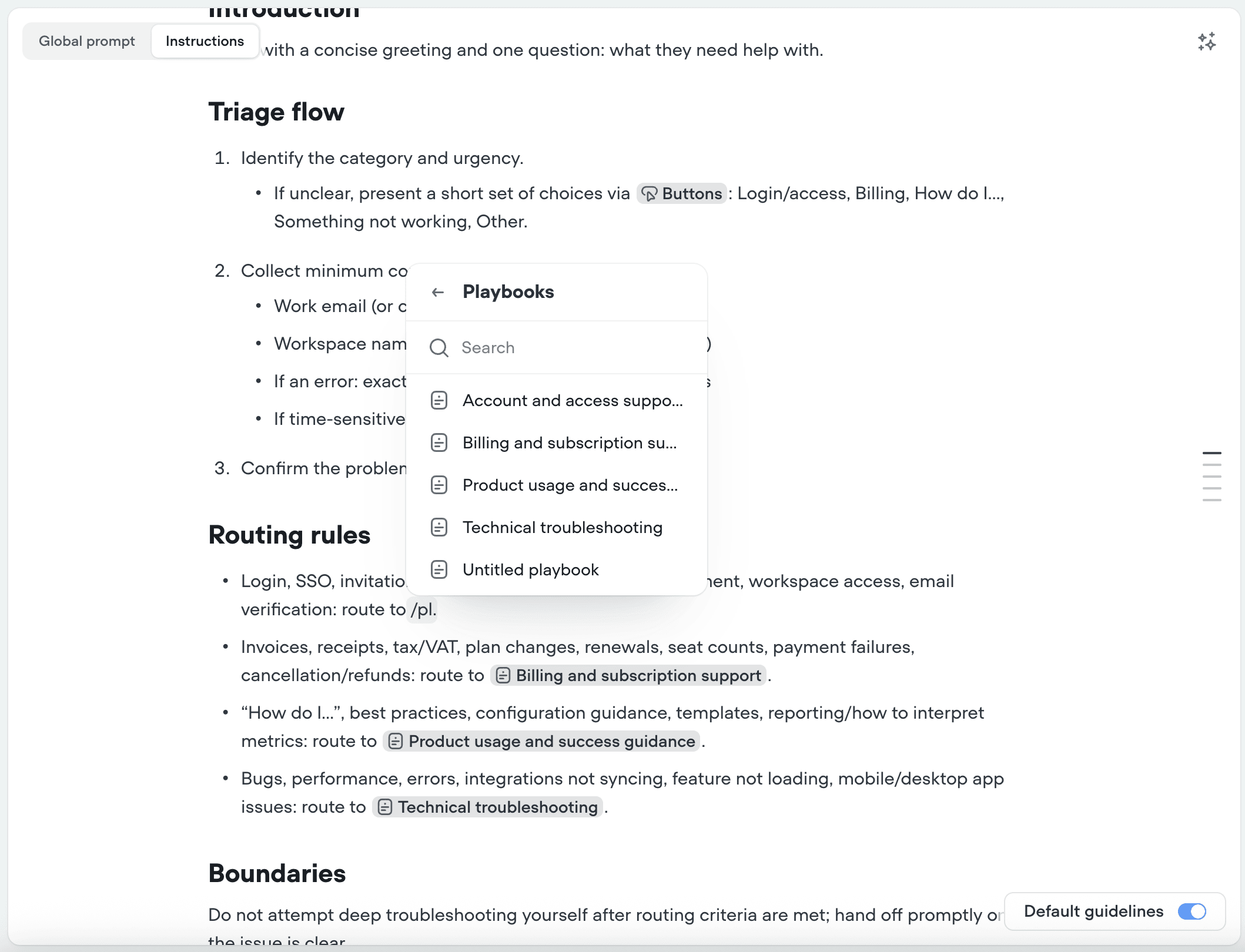
Voiceflow is giving teams a more structured way to write the instructions that control their AI agents. Its new Markdown Editor & Reference Resources update replaces plain instruction fields with a formatting-capable editor and lets builders insert live references to project resources, reducing the risk that a renamed tool quietly breaks an agent’s routing logic.
The company detailed the changes in its August 10 changelog, before highlighting them in an August 19 LinkedIn post. Both features apply to the global prompt, individual agent instructions and playbook instructions.
Structured Instructions Replace Plain Text
The Markdown editor supports headings, lists, bold and italic text, quotes and other common formatting. Builders can use familiar Markdown syntax, such as ## for a heading or **bold** for emphasis, or enter / to open a formatting menu.
That may look like a modest interface improvement, but formatting matters when prompts grow into operational documents. A production agent’s instructions can contain escalation rules, tool-use requirements, exceptions, response constraints and step-by-step procedures. Clear sections and ordered steps make those rules easier for designers, developers and customer support leaders to inspect together.
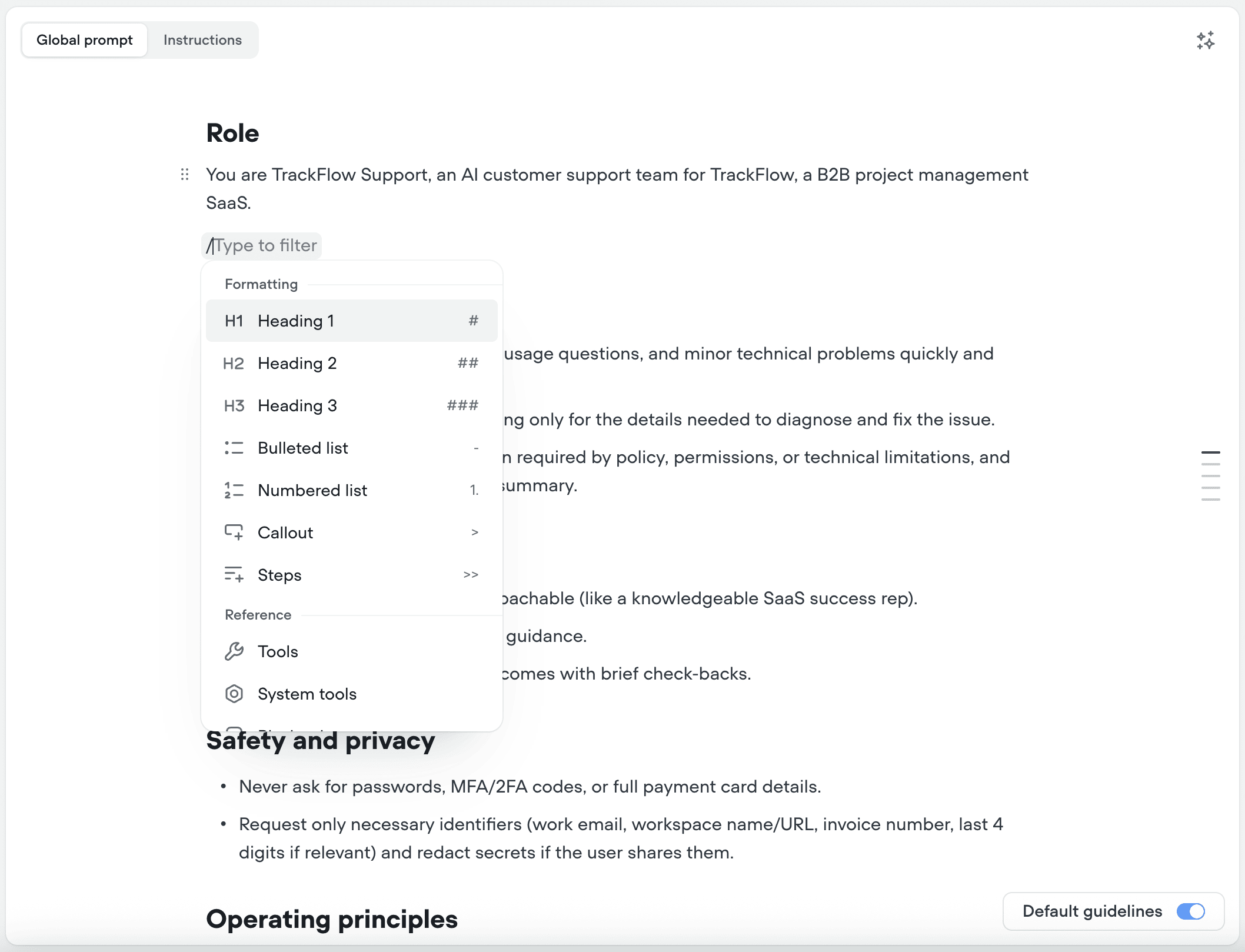
Voiceflow says agents created from a prompt will return instructions in the new formatted style by default. Existing instructions migrate automatically, with the underlying data left unchanged. Teams therefore should not need to rewrite established prompts simply to adopt the editor, although reviewing complex instructions after migration remains a sensible precaution.
The update also addresses collaboration. A long, unstructured prompt can be difficult to review because policies, examples and actions blur together. Markdown makes changes more legible during iteration, helping teams identify whether an edit affects the agent’s overall behavior or one specific procedure.
Resource References Become Live Project Objects
The more consequential change is the ability to reference tools, playbooks, workflows and system tools directly inside instructions. A builder presses /, selects the resource type and chooses an item from the current project. Voiceflow inserts it as a chip bound to the underlying resource rather than as ordinary text.
This distinction solves a common maintenance problem. Previously, an instruction might tell an agent to use a tool by name. If someone later renamed that tool, the written instruction could retain the old name, creating an inconsistency that was easy for a team to miss. With a bound reference, renaming the resource updates its appearances in instructions automatically.
Voiceflow also says a chip will be flagged when its resource is unavailable in the current context, rather than failing silently. Variables remain separate and continue to use { for references.
For small teams running customer-facing agents, the practical benefits include:
- Safer renaming: References stay synchronized with project resources.
- Faster reviews: Collaborators can distinguish actionable resources from descriptive text.
- Earlier warnings: Unavailable resources are visibly flagged.
- More maintainable prompts: Formatting separates policies, procedures and exceptions.
The release fits Voiceflow’s broader push toward production controls. The company has also introduced operational guardrails for safer AI agent operations and cross-session memory with evaluation log visibility. Together, these updates reflect a shift from merely designing conversational flows toward governing agents after they reach customers.
Markdown Editor & Reference Resources does not change what an agent can do on its own. Instead, it makes the control layer more explicit. For builders managing multiple workflows and tools, that can reduce hidden configuration drift and make instructions easier to audit before publishing changes.
Frequently asked questions
What is Voiceflow Markdown Editor & Reference Resources? It is an update that adds Markdown formatting to Voiceflow’s global prompt, agent instructions and playbook instructions. It also lets builders insert live references to tools, playbooks, workflows and system tools, which remain connected to the underlying project resources.
What happens to existing Voiceflow instructions? Voiceflow says existing instructions migrate automatically. The underlying instruction data does not change; the update changes how that content is rendered and edited.
What happens when a referenced resource is renamed or unavailable? Renaming a bound tool, workflow, playbook or system tool automatically updates its references in instruction text. If the resource is unavailable in a particular context, Voiceflow flags the chip instead of allowing it to fail silently.
Sources
1 checkedHow we cover tool news: Create With's tool desk drafts these reports with AI from the sources listed above and checks them against those sources before publishing.




 ElevenLabs
 Glide
Glide
 Stripe