 Vercel
Buying a domain is usually the easy part. Turning it into a functioning website can still involve waiting for registration, navigating DNS settings and finding the right project configuration.
Vercel is tightening that gap with its New setup page after domain checkout, a post-purchase dashboard that tracks domain registration in real time and presents the next practical steps as soon as the domain is ready. The company announced the change in its changelog on August 5, 2026.
The page gives customers direct routes to deploy a new project, connect an existing project, proxy or redirect another website, or configure email. It is a modest interface update, but one aimed at a consequential part of launching a site, when a newly purchased domain is not yet connected to anything.
Registration Status Becomes Part of the Setup Flow
Domain registration can take several minutes to complete. Rather than leaving customers to check elsewhere or repeatedly refresh a domain management screen, Vercel's new page displays registration progress live. Setup actions unlock individually when the domain becomes available.
If registration fails, the same page explains what went wrong and shows the status of the customer's refund. That makes the page useful for both successful purchases and exceptions, reducing the need to piece together information from billing, domain and project screens.
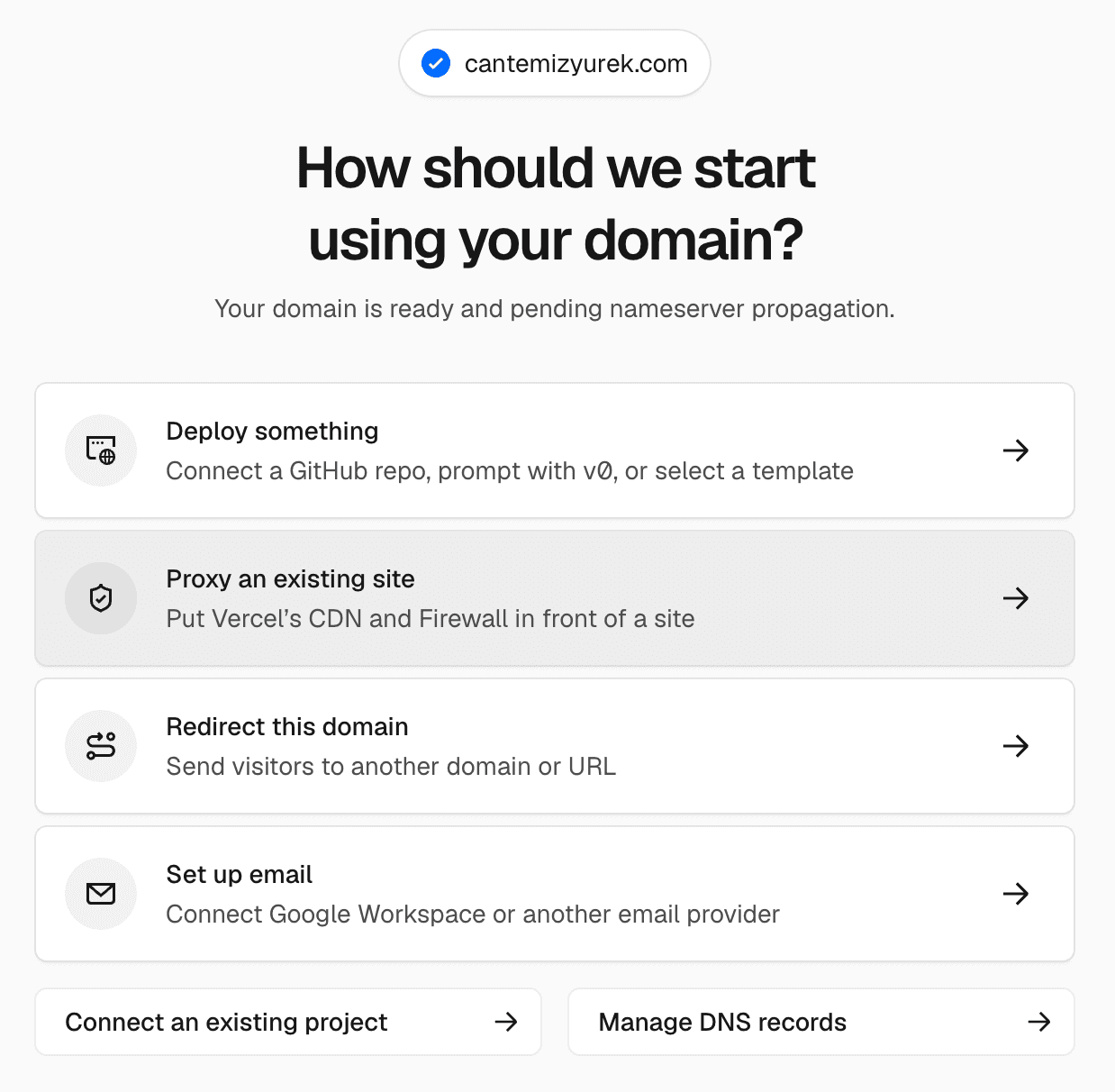
Once registration completes, users can choose among several next steps:
- Deploy something: Opens project creation with the purchased domain already selected. The customer can connect a Git repository, prompt with v0, or begin with a template. Vercel attaches the domain when the project deploys.
- Connect an existing project: Assigns the new domain to a project that is already in the customer's Vercel account.
- Proxy or redirect a site: Provides a path for customers who already operate a site elsewhere and want the Vercel-managed domain to point toward it.
- Set up email: Moves domain email configuration into the immediate post-checkout workflow.
Preselecting the domain during project creation removes a small but common source of friction. Previously, a customer buying a domain and creating a project could treat those as separate tasks, then return to attach the domain afterward. The new flow more clearly treats checkout as the beginning of deployment rather than the end of a purchase.
Why It Matters for Small Teams
For independent builders and small businesses, domain setup is often handled by the same person building the product, writing the site and managing billing. A guided handoff can reduce configuration mistakes and make it clearer whether a delay comes from registration or the project itself.
The update also fits Vercel's broader effort to bring domain purchasing closer to deployment. The company has separately introduced a free first-year domain for new Pro subscriptions, making the experience after checkout more relevant to users receiving a domain through that offer.
Vercel has not announced new pricing or a separate plan requirement for the setup page. Based on the announcement, it appears automatically after a domain is purchased through Vercel. Customers using a domain registered with another provider are not the focus of this particular update.
The practical benefit is straightforward: users can see when registration finishes and act on the domain without searching through the dashboard. For teams trying to move from an idea or repository to a public URL quickly, that is one fewer handoff in the launch process.
Frequently asked questions
What is Vercel New setup page after domain checkout?
It is a post-purchase page shown after someone buys a domain through Vercel. It tracks registration live and provides direct options to deploy a new project, connect an existing project, proxy or redirect a site, or configure email.
What happens if domain registration fails?
The setup page displays information about what went wrong. It also shows the status of the associated refund, according to Vercel's announcement.
Does the setup page require a particular Vercel plan?
Vercel did not specify a separate plan requirement or additional price for the feature. The announcement states that buying a domain on Vercel now takes the customer to the new setup page.
Sources
1 checkedHow we cover tool news: Create With's tool desk drafts these reports with AI from the sources listed above and checks them against those sources before publishing.






 ElevenLabs
 Glide
Glide
 Stripe