Skip to content
All tool news

Tool desk · Updated daily

Tool news·Make·

Make Adds Save As Version to Its Scenario Editor.

Make adds Save as version, custom descriptions and a clearer scenario toolbar for reviewing, restoring and activating workflow changes.

CW

Create With tool desk

4 sources checked · 2 min read · 3 sections

ShareLinkedIn
Make Adds Save As Version to Its Scenario Editor

Save as version gives Make builders a way to label saved scenario states, review them in a readable changelog and restore an earlier version. The update removes the need to clone scenarios purely to test and iterate, or rely on memory to track what changed.

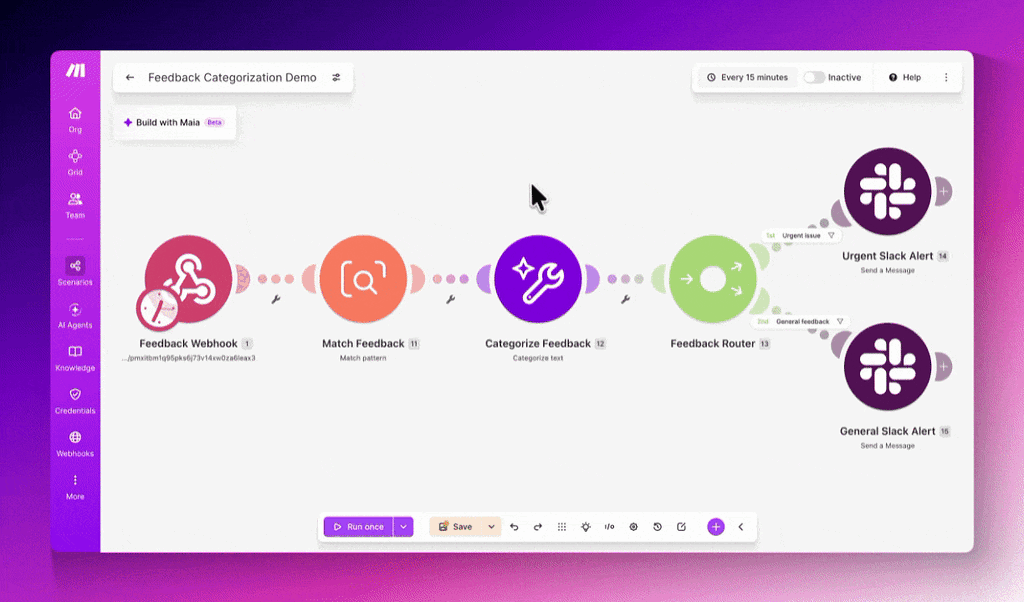
The LinkedIn announcement also introduces a refreshed scenario editor toolbar. Run once and Save now sit together, while scheduling and the Active/Inactive toggle have moved to the top right.

AreaWhat changed
Testing and savingRun once and Save now sit side by side
SchedulingControls have moved to the top right
ActivationThe Active/Inactive toggle is now in the top right
Version historySaved states can include custom descriptions and be restored

Save as version Creates a Readable Changelog

Selecting Save as version lets a builder add a custom description to the saved state. Version history is available from the bottom toolbar, where those descriptions appear as a readable record of previous changes.

From there, builders can review earlier descriptions and restore a previous version. This gives teams a record of what was saved as a scenario changes, rather than requiring separate cloned scenarios for each round of testing.

Descriptions are written by the person saving the version. They can therefore record the purpose of a change, such as adjusting a filter, replacing a connection or testing a different route through the scenario.

The Toolbar Separates Editing From Activation

The toolbar refresh groups controls around different stages of scenario work. Run once sits beside Save for testing and editing. Scheduling and the Active/Inactive toggle remain available in the top-right corner, away from the main building controls.

The underlying actions have not changed in the announcement. The update reorganises where builders find them and adds named saved states to Version history.

Together, the toolbar and version controls cover testing, saving, reviewing and restoring scenarios inside the editor. Teams can keep previous states in Version history instead of maintaining extra scenario copies for iteration.

Frequently asked questions

What is Save as version in Make?

Save as version is a scenario editor feature that saves a state with a custom description. Those saved states appear in Version history, where builders can review the descriptions and restore previous versions.

How do I restore a previous Make scenario version?

Open Version history from the bottom toolbar and review the saved descriptions. Select the previous version you want to restore.

Which Make plans include Save as version?

Plan availability was not included in the announcement. No separate pricing information was provided.

Sources

4 checked

How we cover tool news: Create With's tool desk drafts these reports with AI from the sources listed above and checks them against those sources before publishing.

Worth passing on?

ShareLinkedIn

Go deeper on Make

Related reading, watching and going.

Everything on Make →

The briefing

25 Aug 2026

Claude Code + Figma Console MCP: Side-by-Side Flow

How Claude Code + open-source Figma Console MCP creates a side-by-side design flow that draws straight into your Figma file—no credits or rate limits.

Read →

The briefing

7 Jul 2026

Create With 2026: One Hot Day in Brighton — AI Agents

Recap of Create With 2026 in Brighton: 500+ creators, live AI-agent demos, Claude Cowork workshop, 50+ apps shipped, a 45-project hackathon and community magic.

Read →

The briefing

3 Feb 2026

Vibe Coding vs Automation Platforms: K2.5 & AI Agents

Moonshot's K2.5 rivals GPT-5 at 10x lower cost. AI agents build their own Reddit. Is vibe coding replacing Zapier? Explore the shift from automation to agentic workflows.

Read →
35 min

Conference

The AI-Native Solopreneur: Build Without a Technical Co-Founder

Effie Bersoux presents a paradigm shift in entrepreneurship where AI enables solo founders to build, validate, and scale businesses without technical co-founders or significant capital. Drawing from Growth Girls' experience building 40+ companies in one year and going from a £4m exit (7 years) to a £40m acquisition target (1 year), she demonstrates how AI breaks the traditional capital-talent-traction loop that disadvantages undercapitalized founders. The talk provides concrete frameworks for AI-native operating models, automation decision-making, and rapid idea-to-market validation.

Watch now ↗
41 min

Meetup

The Mindset Shift That's Creating AI Native Companies

Former HMRC Deputy IT Director Ashraf Murtada shares a framework for understanding AI maturity through three levels: AI Assistance (demanding specific outputs), AI Agents (autonomous systems like Team Brain that join meetings and generate documentation), and AI Coding (building complete applications in hours instead of months). The presentation includes live demos of games, internal tools, and SaaS products built rapidly with AI, arguing that software development is becoming commoditized and traditional MVP timelines are collapsing from 6 months to 6 weeks.

Watch now ↗
28 min

Podcast

51. Running OpenClaw on a $5 server... is it ready for prime time?

James and Kieran from Create With explore the practical applications of Claude Code and OpenClaw in early 2025, demonstrating real-world deployments including running AI agents on budget servers, replacing traditional automation tools with AI-powered workflows, and showcasing Bubble's new in-app payment features. The discussion covers hands-on experiences with deploying production websites, managing email campaigns with AI, and building personal AI operating systems.

Watch now ↗

Latest tool news

What else changed this week.

All tool news
MakeDigest

What Make Shipped in Its Latest Update

Make just made scenario design less punishing. An Undo‑Redo feature landed in the scenario editor, giving builders a safety net when they move, link or delete modules.

The Create With Briefing

Don't watch forty changelogs. Read one email.

Every Tuesday: the tool changes worth knowing, real business use cases, and what's on near you. Free, unsubscribe any time.